
Putting a complete source beside a draft does not explain which sentence depends on which passage. Extract the source location, verified fact, allowed wording, and limitation for one claim into a source card. The draft and card can then be checked without repeatedly scanning an archive.
This is not a generic split-pane layout or a screenplay continuity workflow. It supports factual writing where every material claim needs a return path.
Inventory source types and versions
Classify sources as primary material, official documentation, operation records, or explanatory references. Use official evidence for current specifications and actual records for observed operations. Do not turn a secondary explanation into a current product fact.
Assign a source ID, title, version or checked date, storage location, and relevant scope. For a web page, record the heading and check date as well as the URL. For a PDF, record the page; for a local document, use a heading or searchable marker.
Keep confidential material local and exclude secrets that the public claim does not require.
Build one card per claim
Each card contains the question answered, source ID and location, verified fact, permitted wording, limits and exclusions, and the condition that triggers rechecking.
Summarize the fact rather than copying a large passage. When a quotation is necessary, keep it short and mark it as quoted. The card should show what can and cannot be concluded without reopening the source.
For example, one successful two-chapter EPUB generation does not prove that every book always succeeds. Keeping fact and permitted wording separate prevents the draft from expanding the evidence.
Place draft left and card right
Open the draft in the left pane and the current card in the right. Keep the original source in another tab and open it only when the recorded location needs confirmation. The right pane should contain one decision surface, not every source collected for the project.
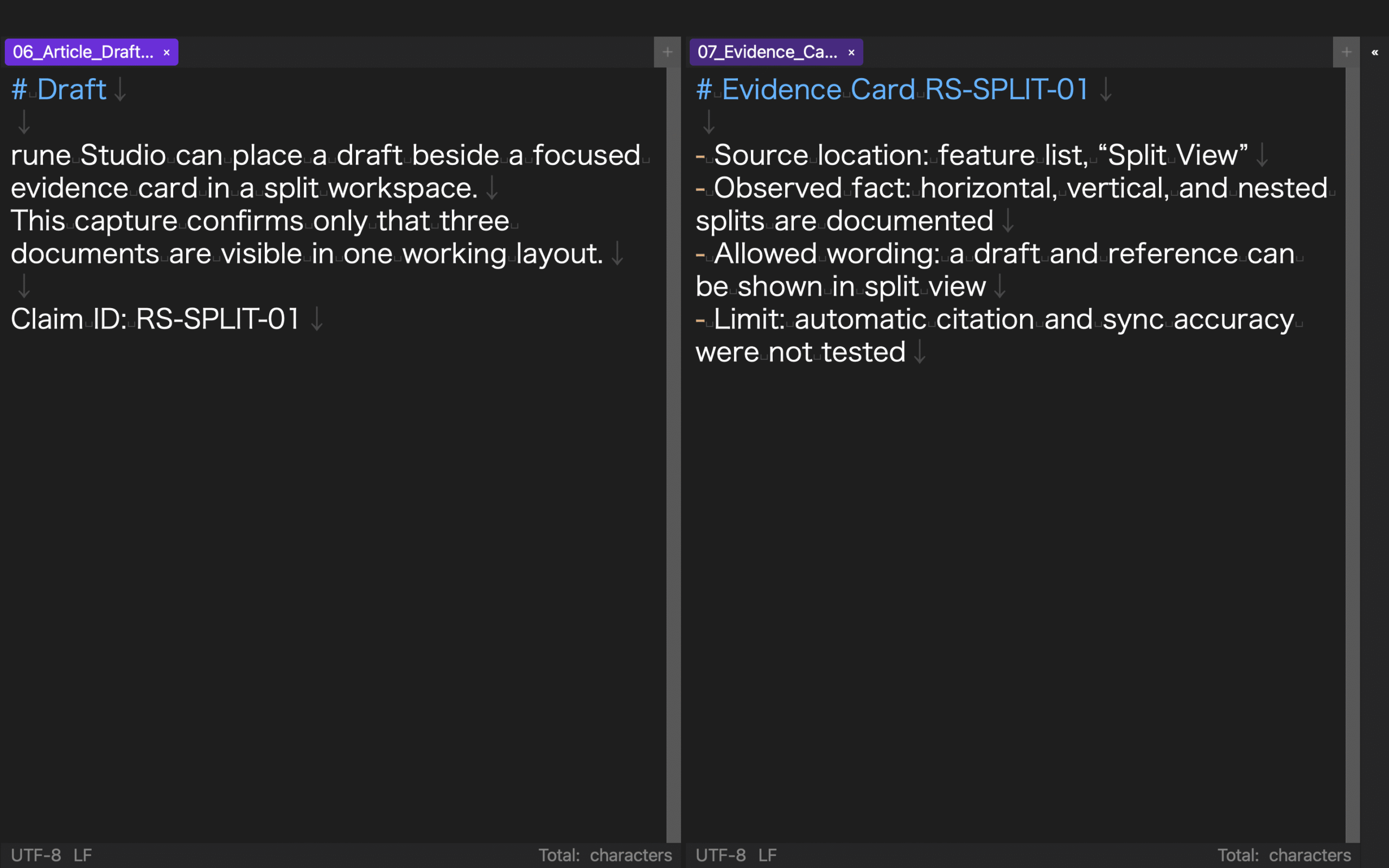
Give the paragraph and card the same temporary claim ID. A search from draft to card and card to draft should take one action. IDs can be removed from the public text after verification.
The rune Studio feature list describes horizontal, vertical, and nested splits with ratios. A separate CLI verification stored three tabs, an h3 layout, ratios 0.52/0.48/0.50, heading linkage, and linked states true/true/false; raw values matched after close/open. This verifies configuration persistence, not automatic citation, source-location synchronization, GUI tab movement, or real scrolling.
Separate fact, interpretation, and recommendation
Write the verified fact first, the interpretation second, and the reader recommendation third. Combining all three into one sentence obscures which portion comes from the source.
Mark interpretation with boundaries such as “within this test” or “this result suggests.” A recommendation is a workflow for the reader, not another product result. Bring necessary exclusions from the card into the draft rather than hiding unverified areas.
For every number, compare unit, object, condition, and date. Do not combine a character count from one operation with an exit code or file count from another.
Search the relationship in both directions
After a section, search every claim ID in the draft and confirm that one card exists. Search every used card ID and confirm that it points to at least one draft sentence.
A sentence without a card may need evidence or reclassification as a general editorial method. A card never used in the draft should leave the active set. Source volume is not evidence quality.
When several sentences share a card, confirm that each remains within the permitted wording. Do not expand one operation result into claims about speed, usability, and safety without separate evidence.
Update only affected claims
When documentation or an operation record changes, create a new source version and search its ID. Recheck only linked cards and draft sentences.
If new evidence contradicts an old claim, preserve the expired card with its date and replace it. Update the public text’s check date and conditions.
Before publication, remove temporary claim IDs while preserving required links or notes. On the card, record the final section heading so the future update path remains.
Put the decision boundary beside the draft
For source-backed writing, place one claim card beside the draft with source location, fact, permitted wording, and limitations. Open the full source only when the location needs confirmation.
Bidirectional claim-ID searches and source versions let the writer return from prose to evidence and revise only affected statements after an update. Split view then protects the scope of a claim instead of merely displaying more material.
As a final audit, close the original source and ask another pass to reconstruct each material statement from the card alone. Reopen the source only when the location, condition, or limitation is ambiguous. Any card that cannot support this reconstruction is incomplete, even when the draft sentence sounds persuasive. Fix the card before polishing the prose.