
When narrowing EPUB production software before purchase, do not begin by adding up features. Make navigation, cover, and colophon three mandatory gates: if one is missing, the candidate does not advance. This article is not a deep audit of each element’s source file, package destination, and repair route. It uses public documentation for an initial screen, then builds one minimal book twice. Only candidates that preserve all three essentials reach the price comparison.
Write one sentence for each mandatory gate
Define the navigation gate as “the reader-facing navigation reaches every intended chapter.” Define the cover gate as “the selected image is incorporated as the book’s cover and is identifiable in a reader.” Define the colophon gate as “the required publication statement can appear at the end of the book.” These are minimum book requirements, not a count of conveniences.
Write the three sentences before opening a trial. Record only documented, not documented, or unsupported during the first screen. Do not convert “not documented” into a pass. Changing the requirement after seeing a product would give later candidates an easier test.
Use public information for the first screen
Read the current product page, official help, and feature list. Check what each product means by navigation, cover, and colophon. “Table of contents support” may describe an editor outline rather than reader-facing EPUB navigation. “Image support” does not necessarily mean that an image can be designated and packaged as a cover.
Remove a candidate before trial if official information clearly excludes one gate. Hold a candidate for clarification if the information is silent. Do not invent a capability from a screenshot or a third-party description. Price, template count, and claimed speed remain outside this first screen.
Build the same three-chapter booklet once
Give each surviving candidate the same short three-chapter manuscript, temporary cover, and temporary colophon information. In the first EPUB, move from reader navigation to Chapters One, Two, and Three. Confirm that the image is identifiable as the cover and that the colophon appears at the end of the book.
This first build answers only whether all three gates are present in one book. Do not rename a chapter, replace the cover, and revise a publication date as separate experiments. A detailed audit of input sources, package destinations, internal references, and element-by-element repair routes belongs to a different test.
Change only one body sentence for the second build
After the first build passes all three gates, change one ordinary sentence in Chapter Two and build again. Do not change a navigation label, cover image, or colophon value. The second EPUB passes when all three chapter destinations still work, the same cover and colophon remain, and only the intended body sentence changes.
This is not a sequence of separate corrections to all three non-body elements. Its purpose is a minimum regression check: a routine manuscript revision must not remove the three mandatory parts. Save the second EPUB under a new name and keep the first result available for comparison.
Never let one gate compensate for another
A candidate fails if it cannot produce the colophon, even when its navigation and cover features are excellent. A sophisticated cover designer cannot compensate for navigation that does not reach the correct chapters. Use three columns—pass, unsupported, and not confirmed—and do not calculate a total score.
If you are willing to add another application later, remove that workflow from the “single EPUB production application” comparison. Evaluate it separately as a multi-tool process. A lower price should not quietly redefine an essential gate as optional.
Compare price only among passing candidates
Once more than one candidate passes the three gates and the second build, compare price, clarity, templates, and support. Because every remaining candidate already satisfies the book requirements, a long feature list cannot hide a missing essential.
If no candidate remains, do not lower the gate without recording the decision. Decide whether navigation, cover, or colophon can move to a separate process, then apply that revised plan to every candidate as a new comparison.
Place Rune Studio in the candidate screen
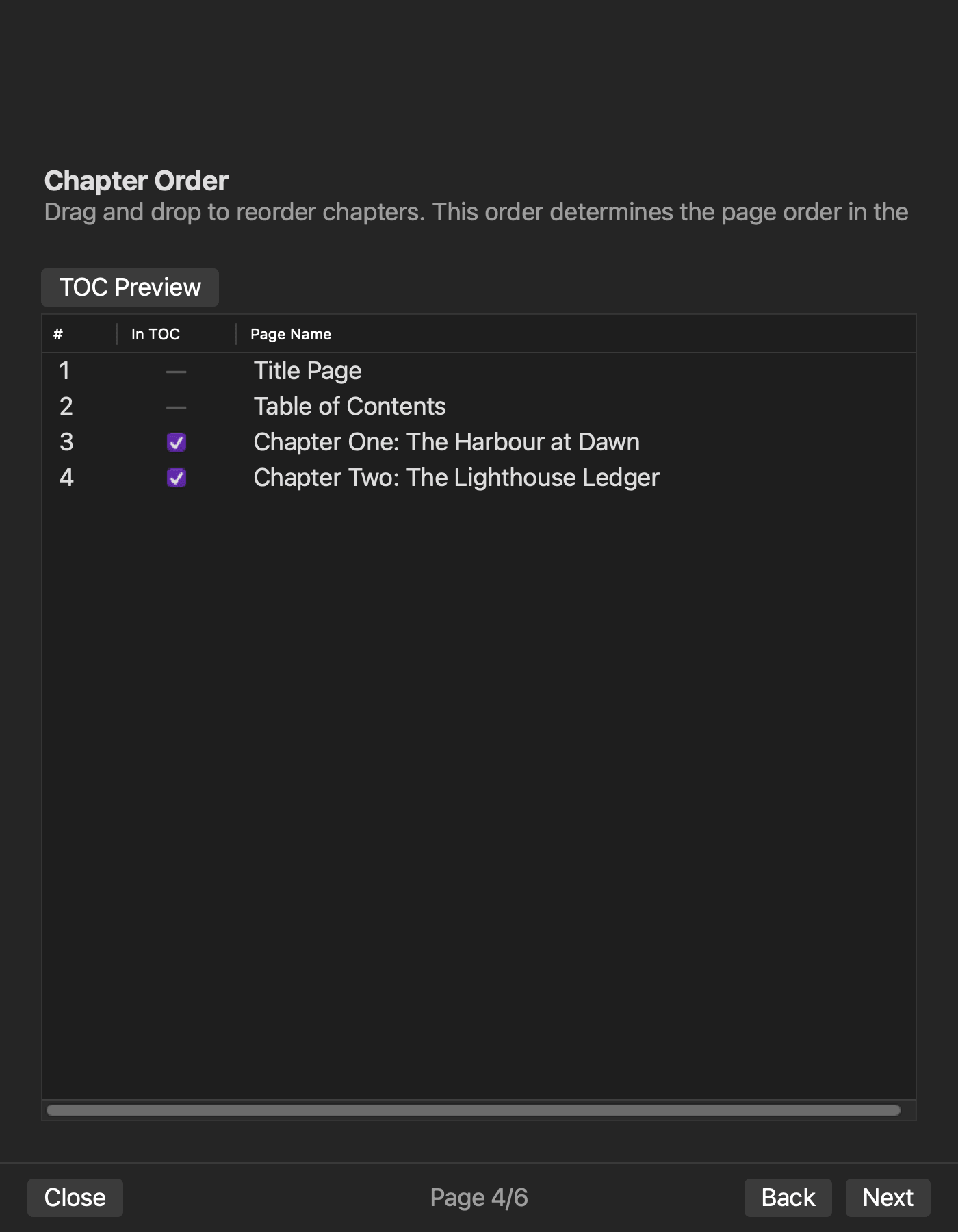
Rune Studio’s published feature information describes a six-page EPUB wizard for book information, manuscript order, navigation inclusion, cover selection, and other generation inputs. The documented EPUB 3 output includes navigation, an NCX for older readers, package information, cover content, and a colophon. That documented range is sufficient to place it in the initial three-gate candidate screen.
This is not a report that the three-chapter booklet passed on a particular Mac. It does not promise acceptance by every store, identical display in every reader, or faster generation than another product. Run the first and second minimal builds with the version you intend to use.
Leave detailed repair-route scoring to a separate test
This article stops at a pre-purchase screen. It does not trace the input source and generated destination of navigation, inspect internal cover references, separate every colophon date, modify all three elements one by one, or assign A-through-D repair-route grades. Apply that deeper audit only to the small set of candidates that survive these mandatory gates.
Conclusion: pass all three gates before comparing price
Write one mandatory sentence for navigation, cover, and colophon, then screen candidates with current public information. Give the survivors the same three-chapter booklet. Use the first build to establish that all three essentials exist and the second build to confirm that one body edit does not remove them.
Do not rescue a missing gate with a total score. Compare price only after all three essentials pass. If Rune Studio is one of the candidates, check the current Mac feature range on the Rune Studio product page before running the two minimal builds.