
Making a horizontal eBook is not a single conversion action. A reliable workflow confirms six inputs: work information, volume, source manuscripts, chapter order, metadata, and a final generation review. A small three-chapter specimen can verify the relationship between those inputs before the complete book is generated.
Checkpoint 1: establish the work information
Create a source-of-truth sheet for the title, author name, language, and horizontal writing direction. Use the same spelling and punctuation in the cover plan, metadata, and production record. If the book belongs to a series, record the series and volume values separately from the visible title.
This workflow covers a reflowable prose eBook with ordinary horizontal paragraphs. It does not cover fixed-layout pages, comics, or exact reproduction of a print design. Those formats require different source and testing decisions.
Checkpoint 2: select the intended volume
In a multi-volume workspace, identify the volume, cover, and planned chapter set for this generation. If a previous volume was duplicated as a starting point, inspect every inherited value. A correct manuscript can still be packaged under the wrong volume title or cover.
Even for a single-volume project, label the test volume separately from the production candidate. A clear name prevents the short specimen from being mistaken for the complete release.
Checkpoint 3: audit the source manuscripts
List each chapter’s filename, heading, opening sentence, encoding, and authoritative location. Exclude backups and retired drafts from the candidate set. Filenames alone are insufficient when several versions have similar names; the opening sentence gives the reviewer another identifying value.
For the first specimen, use approximately two hundred words or characters from each of three chapters. Include the heading and the paragraph patterns actually used in the book. If the manuscript contains images or links, verify that their referenced files are present inside the portable project structure.
Give headings distinct names. Repeating “Chapter” three times makes a table-of-contents destination difficult to verify. Names such as “Departure,” “Decision,” and “Return” make the intended source and destination clear.
Checkpoint 4: define chapter order and navigation
Do not rely on alphabetical filename order. Explicitly arrange the three chapters in reading order and map each table-of-contents label to one source file. Decide whether front matter, acknowledgments, and colophon pages appear in the table of contents as well as where they appear in the reading order.
After generation, test two separate facts. Page through the book and confirm that Chapter 1 is followed by Chapters 2 and 3. Then select every table-of-contents item and confirm that it opens the matching heading. Correct reading order does not prove correct navigation targets.
Checkpoint 5: review metadata without guessing
Compare the title, author, and language with the source-of-truth sheet. Fill optional identifiers only when the project has an authoritative value. Store-specific identifiers and distribution requirements should come from the current specification of the intended service, not from a guessed placeholder.
Pricing, tax information, sales copy, and store submission are separate processes. Keeping them out of the generation checklist prevents an incomplete business decision from blocking a valid structural test.
Inspect the cover choice again. A temporary cover is acceptable for a specimen, but the output filename and review record must identify it as temporary. Before a production candidate is generated, replace it with the approved cover and verify the path.
Checkpoint 6: read the final review before generating
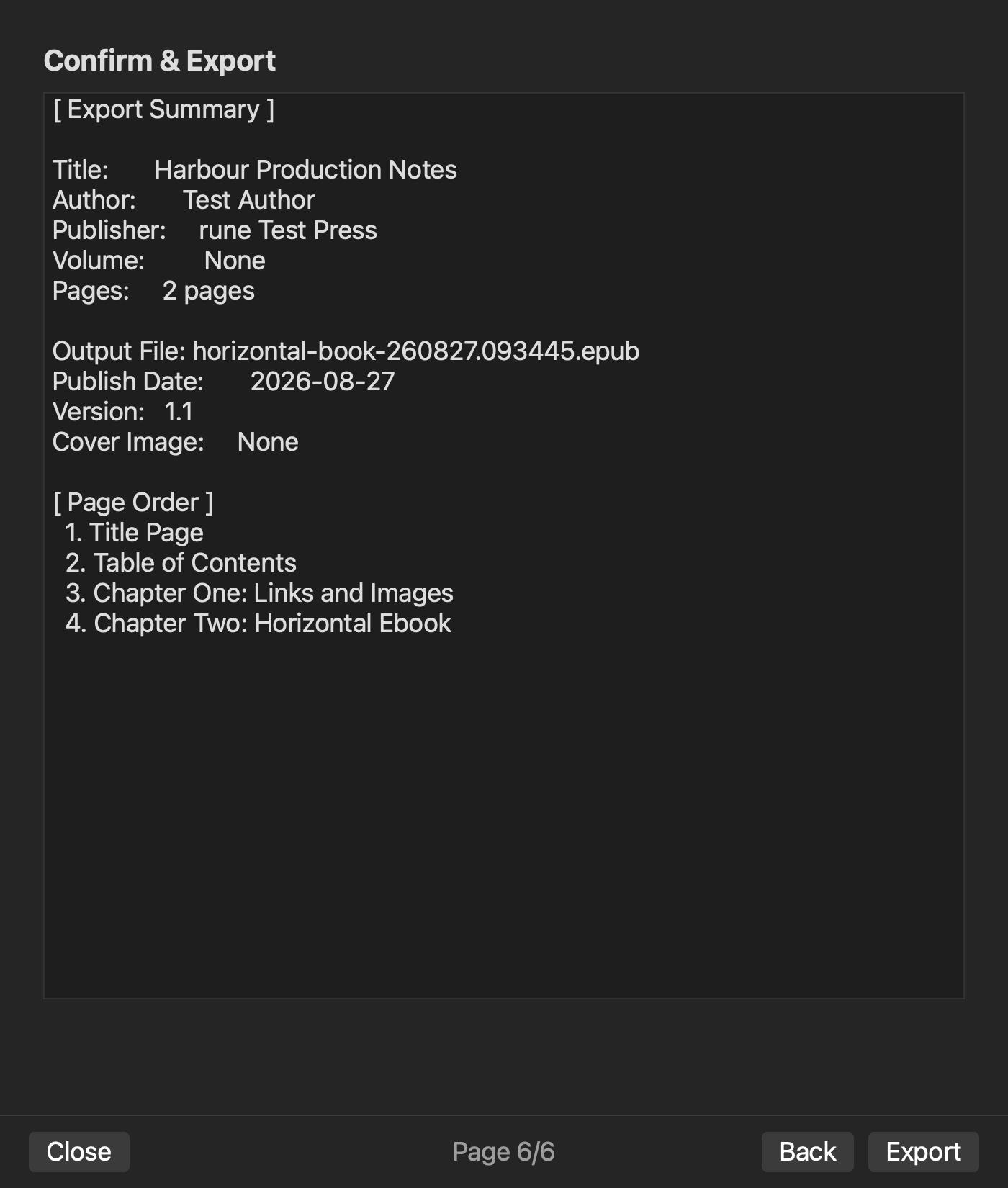
Compare the displayed work information, volume, manuscript count, chapter order, cover, and metadata with the six-row input record. Reaching the final screen is not evidence that the values are correct. Mark every difference from the previous specimen and explain why it changed.
Name outputs sequentially, such as horizontal-sample-01.epub and horizontal-sample-02.epub. Preserve the previous file so that a corrected navigation link can be compared without guessing which version was opened.
Separate structural inspection from reading inspection
Structural inspection checks the title, author, cover, included chapters, reading order, and table-of-contents destinations. Reading inspection checks paragraphs, headings, emphasis, images, and links that actually occur in the manuscript. An EPUB opening successfully is only the first observation; it does not verify either complete list.
When a problem appears, return to the authoritative source. Correct prose or notation in the manuscript, work-wide values in the work information, and misplaced chapters in the chapter-order input. Editing generated XHTML directly can make one file look correct while the next generation recreates the error.
Open the resulting EPUB in an intended reading environment after the editor-side checks. A preview and a generated book are different artifacts, and reader applications can expose navigation or layout differences.
The documented Rune Studio scope
Current documentation for the Mac version of Rune Studio describes a six-page EPUB wizard covering work information, volume, manuscripts, chapter order, metadata, and a final review. It also describes EPUB 3 generation for horizontal works.
These are documented capabilities. They do not prove that the three-chapter specimen has been completed, guarantee store acceptance, cover fixed-layout production, or establish identical rendering in every reader. Keep the external reading check in the workflow.
Define completion as a traceable package
A production candidate should contain the authoritative manuscripts, work-information record, chapter map, approved cover, generated EPUB, and inspection results. The record should show which input was changed after each failed check and which output version contains the correction.
The practical way to make a reflowable horizontal eBook is to pass a small specimen through all six checkpoints, inspect structure and reading separately, and only then replace the specimen with the complete chapters.
To review the currently documented horizontal EPUB workflow, see the Rune Studio product page.