
To evaluate a Mac text editor for a 300,000-character novel, do more than open one long file. Create files containing 299,999, 300,000, and 300,001 characters. Verify where the large-file classification changes, then test whether editing, search, and saving remain available after the change.
A claim of “large-file support” does not reveal the threshold or whether the editor disables decoration or the core editing path. Comparing the same content immediately below, at, and above the boundary helps separate designed behavior from an error.
This article is not a broad purchasing checklist or a daily production routine. It is a diagnostic experiment for reproducing the 300,000-character boundary.
Separate core operations from display aids
Divide functions into two layers:
- Core: open, navigate, input, search, replace, save, close, and reopen
- Display aids: syntax coloring, invisible characters, matching-word emphasis, registered-word highlighting, line numbers, and character count
Disabling a display aid for a long manuscript is not the same as losing the ability to edit the body. Record the two layers separately. Do not fail a candidate merely because decoration is reduced when core work completes.
Conversely, a window that opens is not a pass. Search for a known term, make a limited change, save, and find the new value after reopening.
Create three boundary files
Use test copies rather than the authoritative manuscript:
- 299,999 characters: immediately below the threshold
- 300,000 characters: exactly at the threshold
- 300,001 characters: immediately above the threshold
Hold content constant so notation density does not confound the boundary test. Repeated Japanese characters are acceptable for classification; a duplicated manuscript is better for the later editing test.
Check the unit the application uses. Character count is not file size or byte count. If the specification says Unicode characters, prefer the application’s own inspection result instead of estimating from Finder.
Name each test file with its expected count and place them in one folder. This reduces the risk of opening the wrong sample.
Verify classification before judging speed
Inspect each file and record the large-file flag. For a rule stated as “300,000 characters or more,” the expected result is normal at 299,999 and large at both 300,000 and 300,001.
If the exact-boundary result differs, check whether the documentation says “more than” rather than “or more,” whether line breaks count, and how the application defines a character. Use the reported classification rather than perceived speed.
Then record any warning and each disabled display aid. Distinguish a temporary suppression for the open large file from a permanent settings change.
Run the same core sequence
On the files classified as large, perform the same sequence:
- Navigate to the beginning, middle, and end.
- Search for a term known to exist.
- Replace only one test occurrence.
- Save manually.
- Close and reopen the file.
- Search for the replacement value.
If timing matters, control the Mac, other running applications, power state, and first-versus-second run. First record completion. Compare performance in a separate experiment.
Perform replacement only on a duplicate and limit it to one occurrence. A project-wide replacement adds unnecessary risk and makes saved-state verification harder.
Confirm that display suppression is temporary
For each display aid, check three states: available in a normal file, disabled in a large file, and available again after returning to a short file. Failure to return may indicate a changed setting or defect rather than temporary optimization.
Authors who need every display aid can consider splitting the manuscript into chapters. That decision affects the source of truth, project search, order, and export workflow, so do not automatically restructure the book as part of this threshold test.
The measured threshold in rune Studio
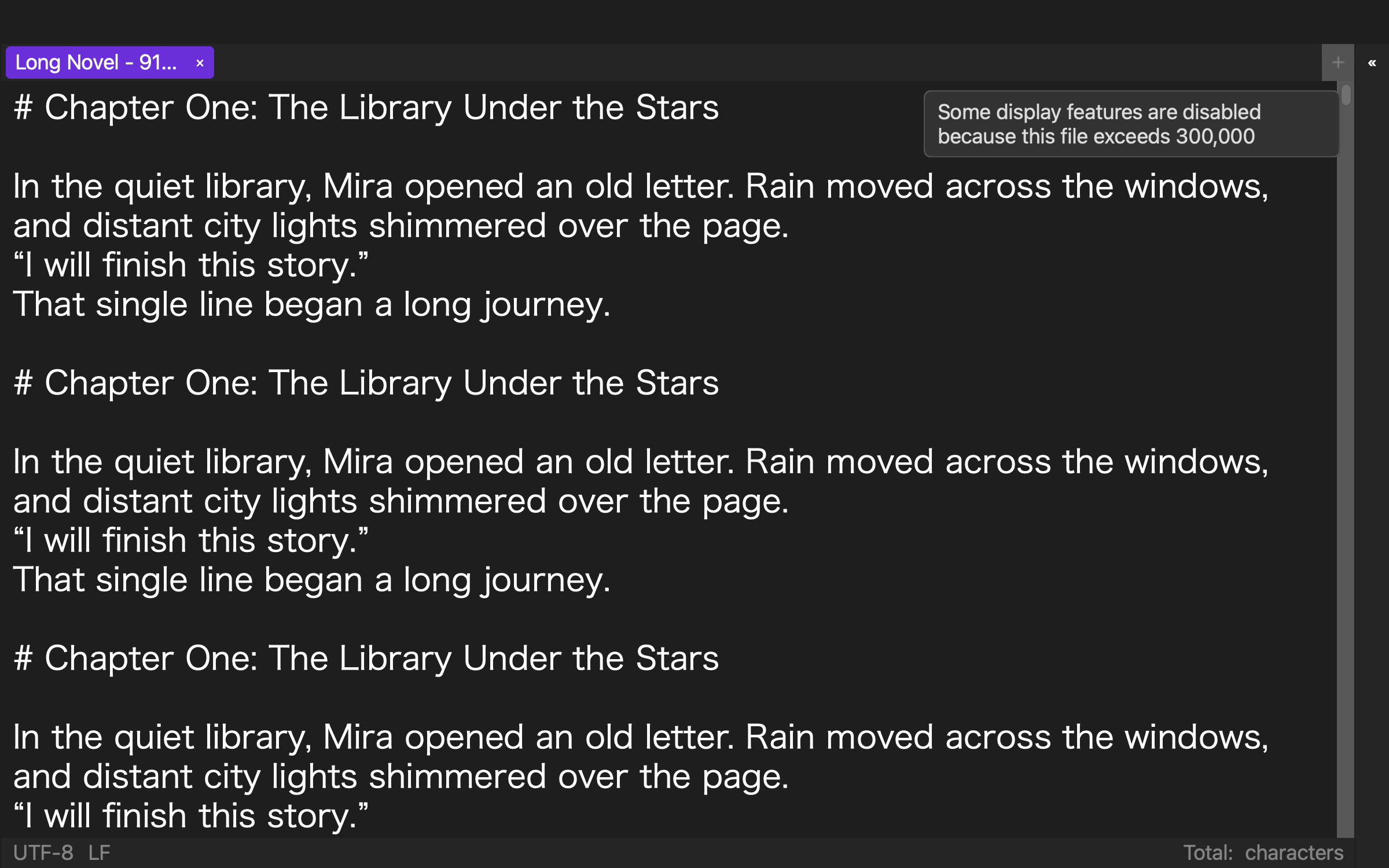
The current Mac version of rune Studio defines a large file as 300,000 or more Unicode characters. In a command-line test with repeated Japanese “あ” characters, 299,999 returned isLargeFile false; 300,000 and 300,001 returned true.
The documented large-file optimization disables coloring, invisible-character marks, same-word highlighting, registered text highlighting, line numbers, and character counting. The help directs users to split the file when all display features are required.
In a separate 919,514-character test, command-line search, one limited replacement, manual save, and a second search completed; the saved file contained 919,517 characters. This demonstrates the tested core route for that file. It does not guarantee GUI responsiveness, IME latency, every Mac configuration, or the upper limit for substantially larger manuscripts.
Pass the boundary and the core separately
Large-novel support should not be reduced to whether one long file opens. Reproduce the classification with 299,999, 300,000, and 300,001 characters. Record which display aids stop.
Then run the identical edit, search, limited-replace, save, and reopen sequence. A candidate whose behavior changes at the documented boundary, suppresses only the intended heavy displays, and completes the core sequence can proceed to a separate performance test.