
To create an eBook with a table of contents, cover, and colophon, prepare the body, navigation map, adopted cover image, and approved colophon values as one creation set. Map that set to the export settings, generate the EPUB, and then accept four outputs: BODY, NAV, COVER, and COLOPHON. Creation—not a post-export audit—is the center of this guide.
The example is a short three-chapter book with three TOC entries, one adopted cover, and approved work title, author, publisher, version, and publication date. Long-term source storage, team handoffs, and horizontal technical books with tables, code, and body images are separate workflows. This article concentrates on assembling the TOC, cover, and colophon in one book.
Prepare one input sheet for four outputs
List the three body files and their order, each TOC label and destination, the cover path and hash, and the values that must appear in the colophon. Give the chapters IDs C01 through C03, and map every TOC label to one of those IDs. Do not overwrite a provisional cover with the adopted image under the same ambiguous name.
Approve colophon values before export. Work title, author, and publisher feed Series Information; version and publication date feed Metadata. If a project also manages contact or rights wording that is not documented as an independent wizard field, keep it in an external approved source. Do not invent a Rune Studio field for it.
Set book information and select three chapters
Current Rune Studio documentation assigns work title, author, publisher, orientation, filename, language, and paragraph settings to page 1, Series Information. Page 2 is Volume Selection for a single volume or volume number and previous output information. Page 3 selects manuscript files.
For this example, map the approved book card to page 1, plan a single-volume choice on page 2, and select the authoritative C01, C02, and C03 files on page 3. This is a documentation-based creation procedure. It is not a claim that the article-specific three-chapter case completed the current macOS UI.
Build navigation from labels, destinations, and inclusion
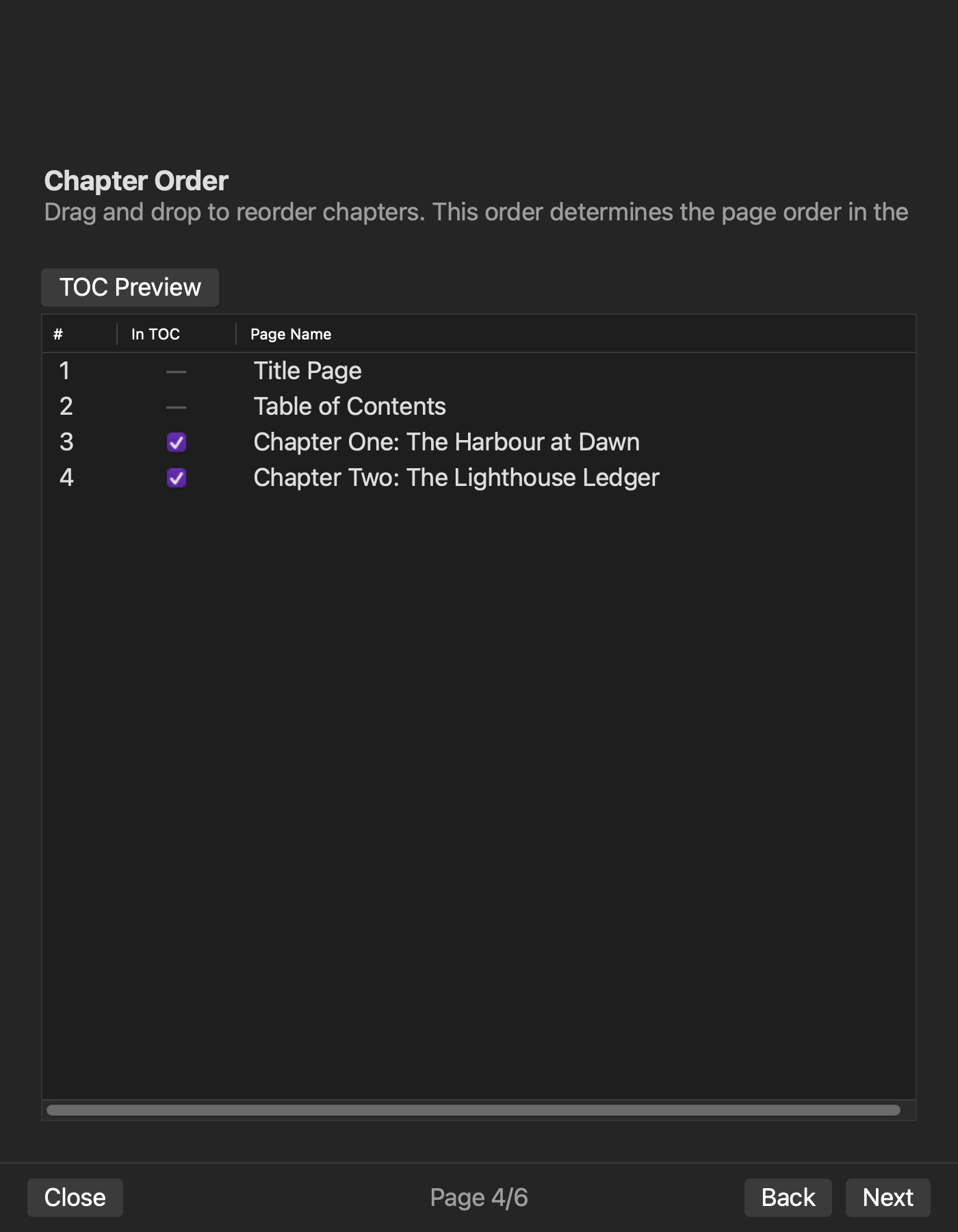
On page 4, Chapter Order, arrange the chapters in reading order and select whether each appears in the table of contents. The navigation sheet needs one row for display label, destination chapter ID, and inclusion. Three included chapters produce three input chapters, three TOC entries, and zero exclusions.
A correct label pointing to the wrong chapter is not complete. Before generation, compare each destination ID. After generation, compare destinations in nav.xhtml and NCX. If a chapter is excluded from navigation, do not assume that it also disappeared from spine reading order.
Set the cover and the values that feed the colophon
Page 5, Metadata, includes version, publication date, and cover image in the current documentation. Record the adopted cover path and hash, then compare the work title and author in the book card with any readable wording on the image.
The generated colophon is checked against the approved work title, author, publisher, version, and publication date entered across Series Information and Metadata. Documentation lists colophon generation, but the article-specific three chapters, adopted cover, and approved values have not completed all six visible pages as an observed run. The steps here come from documentation, not measured interface results.
Confirm the set and generate one EPUB
Page 6 confirms page order, TOC targets, cover, and filename before generation. If the displayed three-chapter order, three TOC entries, cover, or title differs from the input sheet, stop and return to the responsible page from 1 through 5.
After generation, record the EPUB filename, generation time, and SHA-256. Keep one creation set tied to one output instead of substituting another input after an error. Current documentation places output in the workspace EPUB folder.
Accept four generated outputs briefly
Post-export checking closes the creation procedure; it does not replace it with a generic package audit.
| Output | Check after generation | Return point |
|---|---|---|
| BODY | three chapter XHTML files and spine order | file selection or chapter order |
| NAV | three labels and their destinations | chapter order and TOC inclusion |
| COVER | cover registration, reference, and image bytes | Metadata cover selection |
| COLOPHON | approved values in colophon XHTML | Series Information or Metadata |
After one correction, generate under a new output name and recheck the changed output plus one neighboring output. The conclusion is whether the four configured elements entered one book, not whether every internal resource has been assigned a three-way audit exit.
Keep observed Rune Studio evidence bounded
An image-free two-chapter sample completed a route with book information, source files, chapter order, navigation, OPF, nav, NCX, spine, and colophon resources. It also showed that excluding chapter two from navigation left it in the spine, and that a one-word change appeared in a separately named rebuild.
In a cover-bearing sample, cover bytes and references existed in the ZIP, while the completion screen treated the image as missing. Cover selection and packaging therefore have documentation and partial confirmation, but the cover-enabled route is not complete. The three-chapter sample and visible six-page interface remain unobserved.
Configure four elements before creating the book
The direct answer is to prepare the body, navigation map, cover, and approved colophon values together, map them to the generation settings, and confirm BODY, NAV, COVER, and COLOPHON in the resulting EPUB.
Start by writing the three labels and destinations, adopted cover hash, and five approved bibliographic values on one sheet. If you use Rune Studio, check the current generation scope on the Rune Studio product page and keep the unresolved cover result separate from the documented creation steps.