
For the first EPUB run, map every accepted source value to a wizard field and keep the entered values and results under one run ID. The deliverable here is not a finished publication. It is a record showing what was entered, where it came from, and what the first run actually proved.
The preflight guide for a first EPUB decides whether the manuscript, contents map, and cover are acceptable. This guide starts with that GO packet. Later manuscript revisions and repeated output belong to the revision and rebuild guide.
Convert the accepted packet into input values
Receive the GO ID, bibliographic ID, manuscript and cover paths and hashes, chapter order, contents labels, and inclusion decisions. Build a field map before entering anything.
The map needs screen page, input field, source field, planned value, entered value, and decision. Mark an empty field as not applicable, pending, or missing. An unlabelled blank cannot distinguish an intentional omission from an input error.
Map the six wizard pages
Use this page-level map based on the current documented workflow. Record the actual field name because page labels or order can change by version.
| Page | Input | Accepted source | First-run record |
|---|---|---|---|
| 1 | work title, author, publisher, orientation, filename, language, paragraph settings | bibliographic sheet / run plan | planned / entered |
| 2 | single volume or volume number, previous output information | volume record | selection / referenced output |
| 3 | manuscript files | manuscript receipt | path / hash |
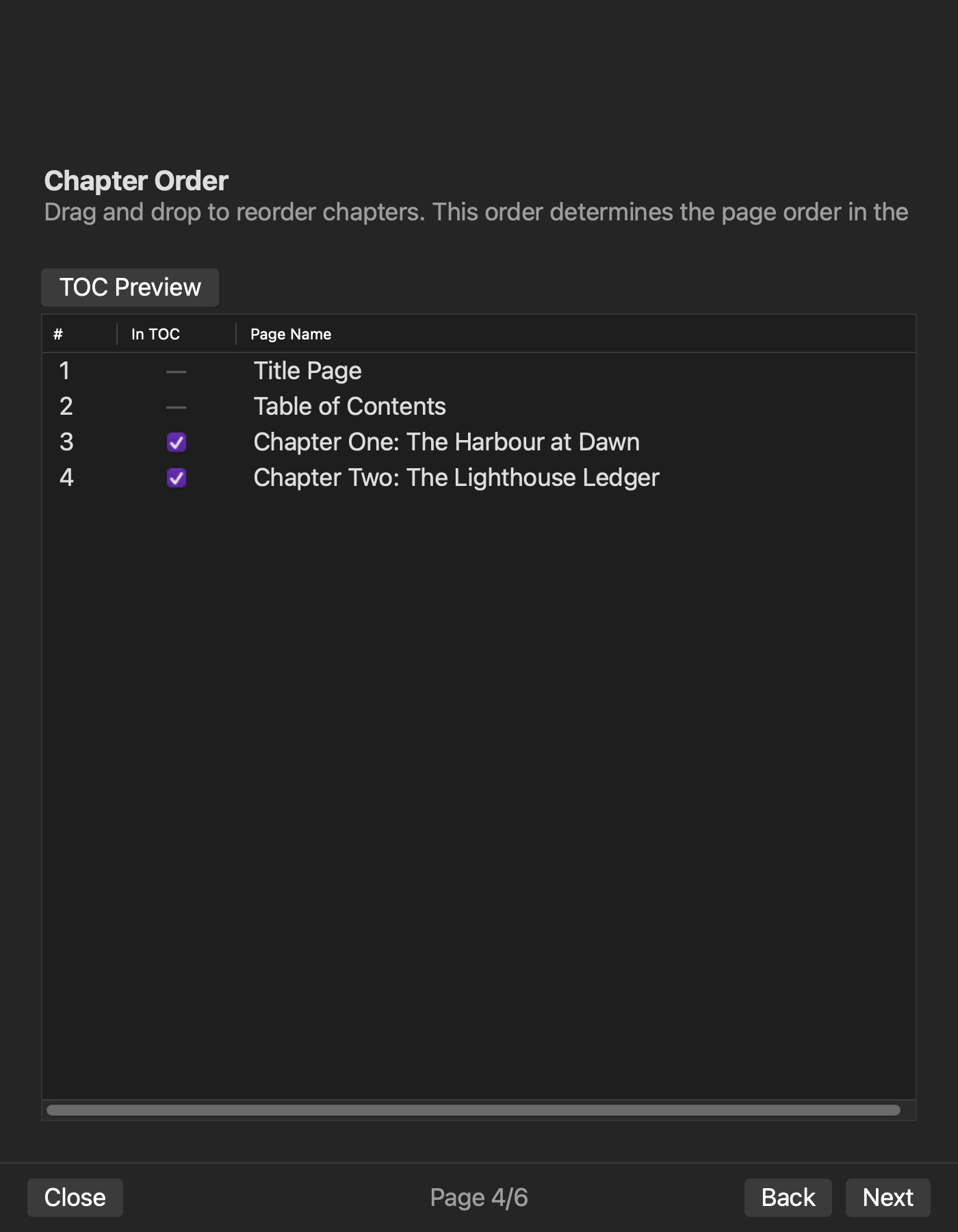
| 4 | chapter order, TOC label, inclusion | contents receipt | order / count |
| 5 | version, publication date, cover image | bibliographic and cover receipts | values / cover hash |
| 6 | confirm page order, TOC targets, cover, and filename; then generate | page 1–5 input records | confirmation / run ID |
This table maps the current documented Rune Studio page structure to the production receipts. A project edition ID, book identifier, and planned output location are not documented as separate wizard fields. Keep them in external run-record columns when needed; do not assign them to pages 2, 5, or 6.
This is documentation-based field mapping, not evidence that the article-specific six-chapter sample completed every page in the current macOS UI. No screen result or interface experience is stated here.
Reconcile chapter and TOC counts
The article sample contains six chapters, C01 through C06. Record manuscript path, chapter title, order, and TOC inclusion for each. After entry, save the entered chapter count, included TOC count, and excluded count.
Six included chapters should produce counts of six, six, and zero. If front matter is excluded, record why the counts differ. Counts alone are insufficient; compare every label and destination.
The hands-on verification operation used a shared two-chapter specimen, not this six-chapter UI specimen. The six-chapter table remains a first-run record design.
Record the start state and output
Store execution time, application or recorded search result version, disposable copy, input paths and hashes, run ID, output path, and exit state. After generation, record the output hash and check nav, NCX, OPF, spine, chapter files, and image references.
A completion message in the interface does not replace the output evidence. If an error occurs, do not silently substitute another source. Return to the field map and identify whether the accepted source or its transcription is responsible.
Use the confirmed text-only result precisely
A hands-on check with a disposable copy prepared, checked, and exported a horizontal, text-only two-chapter EPUB, then examined the result. Nav, NCX, OPF, spine, chapter order, and TOC inclusion were confirmed.
This confirms the common output path for chapter and contents information. It does not confirm the six-chapter sample, every current macOS wizard page, or the interface experience.
Separate cover ZIP evidence from the check decision
For a cover-enabled test, the EPUB ZIP contained the cover image and its references. The current check result nevertheless remained a failed result with a missing-image diagnostic.
Record “cover stored and referenced” as confirmed and “cover-enabled EPUB passed structure check” as pending. If cover is mandatory, stop with the diagnostic, output path, and hash. A cover-free alternative requires a new run ID.
Return to the responsible page
Use the field map to return work title, author, publisher, orientation, filename, language, or paragraph-setting errors to page 1. Return single-volume or volume-number selection and previous-output references to page 2, manuscript selection to page 3, chapter order or TOC inclusion to page 4, and version, publication date, or cover to page 5. If page 6 shows the wrong page order, TOC targets, cover, or filename, do not generate; return to the responsible page from 1 through 5.
Return an incorrect project edition ID, identifier, or planned output location to the external bibliographic sheet or run plan, not to an invented wizard page. Keep the documented output to the workspace EPUB folder separate from the path recorded after generation.
If the accepted source is wrong, return it to the preflight guide for a first EPUB. If the source is correct but the entered value differs, correct this run and issue a new run ID. This keeps acceptance errors separate from transcription errors.
Close the first-run record at the correct boundary
Close the record only when every field has a source and entered value, the output path and hash exist, and confirmed, pending, and failed checks are separated. A pending cover check must not be reported as a completed cover workflow.
Stop before repeated manuscript revision and output. Pass that work to the revision and rebuild guide after preserving the first-run facts.
Conclusion: make every field traceable to its source
Map the accepted packet to Series Information, Volume Selection, File Selection, Chapter Order, Metadata, and Confirm and Export. Compare planned and entered values while keeping project edition IDs, identifiers, and planned output locations in external management fields. After generation, connect the actual output path, structure, and structure check results to one run ID.
Start by mapping the work-title field on page 1 to its exact bibliographic source. If you use Rune Studio, review the current EPUB creation fields on the Rune Studio product page and close the first-run record with the cover structure check still marked pending when applicable.


