
When a manuscript approaches 300,000 characters, keeping every visual aid active is not always the best priority. A Mac text editor can preserve writing, search, and saving while reducing display work that is recalculated after each change, such as notation coloring, line numbers, or continuous highlights.
If those aids disappear after you open a large file, the editor is not necessarily broken. It may have deliberately entered a reduced-processing state. The practical question is what remains available and how you can use it to continue the draft.
This article focuses on that workflow after the manuscript becomes large. It does not rank products or repeat the seven-feature buying checklist covered by STUDIO-001.
Reduced display does not mean disabled editing
A text editor does more than draw letters. It may recolor Markdown or other notation, show spaces and line breaks, highlight every occurrence of a selected or registered word, calculate line numbers, and refresh the character count after a change.
These tools help with revision, but they are not the prose. If the editor can pause them while retaining text entry, find and replace, saving, cursor movement, and encoding checks, you can continue working on the manuscript without treating every visual aid as equally urgent.
The distinction also tells you what to do next. Continue drafting with the essential operations, then move a smaller section into a chapter-level revision workflow when you need intensive coloring or highlighting.
Display work that can be reduced
Typical candidates for a large-file mode include:
- Markdown or editing-notation coloring
- visible markers for spaces, tabs, and line breaks
- continuous same-word highlighting
- registered-word highlight lists
- line numbers
- continuous character-count updates
These features are useful, but a first draft can often continue without them. The operations that should remain are different:
- entering, deleting, and undoing text
- find and replace
- searches for half-width characters or other manuscript checks
- manual saving and autosave when saving is safe
- cursor movement
- identification of characters that the selected encoding cannot represent
Knowing the two groups prevents a missing line-number gutter from being mistaken for a lost manuscript.
A product-independent long-manuscript workflow
Prioritize adding and finding prose during the draft
During the first draft, keep the operations that add, locate, and preserve text. If your editor lets you turn off continuous coloring or large highlight lists, record the old settings and test the reduced configuration on a copy.
For book-wide terminology checks, use search rather than scrolling from the beginning. Duplicate the manuscript before a broad replacement, even if the editor normally provides undo.
Use a smaller unit for visual revision
When you need line numbers, registered-word highlights, or detailed notation coloring, create a chapter-level working copy or use separate chapter files. Decide which file is authoritative before editing so that two versions do not diverge.
Splitting is not mandatory. One file is convenient for searching the entire novel. Chapter files reduce the range processed by visual aids but require project-wide search and chapter-order management. Choose according to whether you revise mainly by chapter or across the whole book.
Separate autosave conditions from large-file conditions
Autosave can pause for a reason unrelated to file size. For example, an encoding such as Shift_JIS cannot represent every Unicode character. An editor may pause autosave rather than silently lose a symbol. Check whether the cause is reduced display processing or an unsafe encoding conversion before changing settings.
What happens in Rune Studio after 300,000 characters
The following behavior describes the current Mac version of Rune Studio.
Rune Studio classifies content of 300,000 characters or more as a large file. It stops Markdown and EPUB notation coloring, visible editing marks, same-word and registered-word highlights, line numbers, and continuous character-count calculation.
Its implementation retains text editing, in-file find and replace, half-width-character search, saving and autosave, cursor movement, and encoding-error checks. Autosave pauses when the selected encoding cannot safely represent a character; that is a safety condition rather than a result of large-file optimization.
1. Confirm the large-file notice
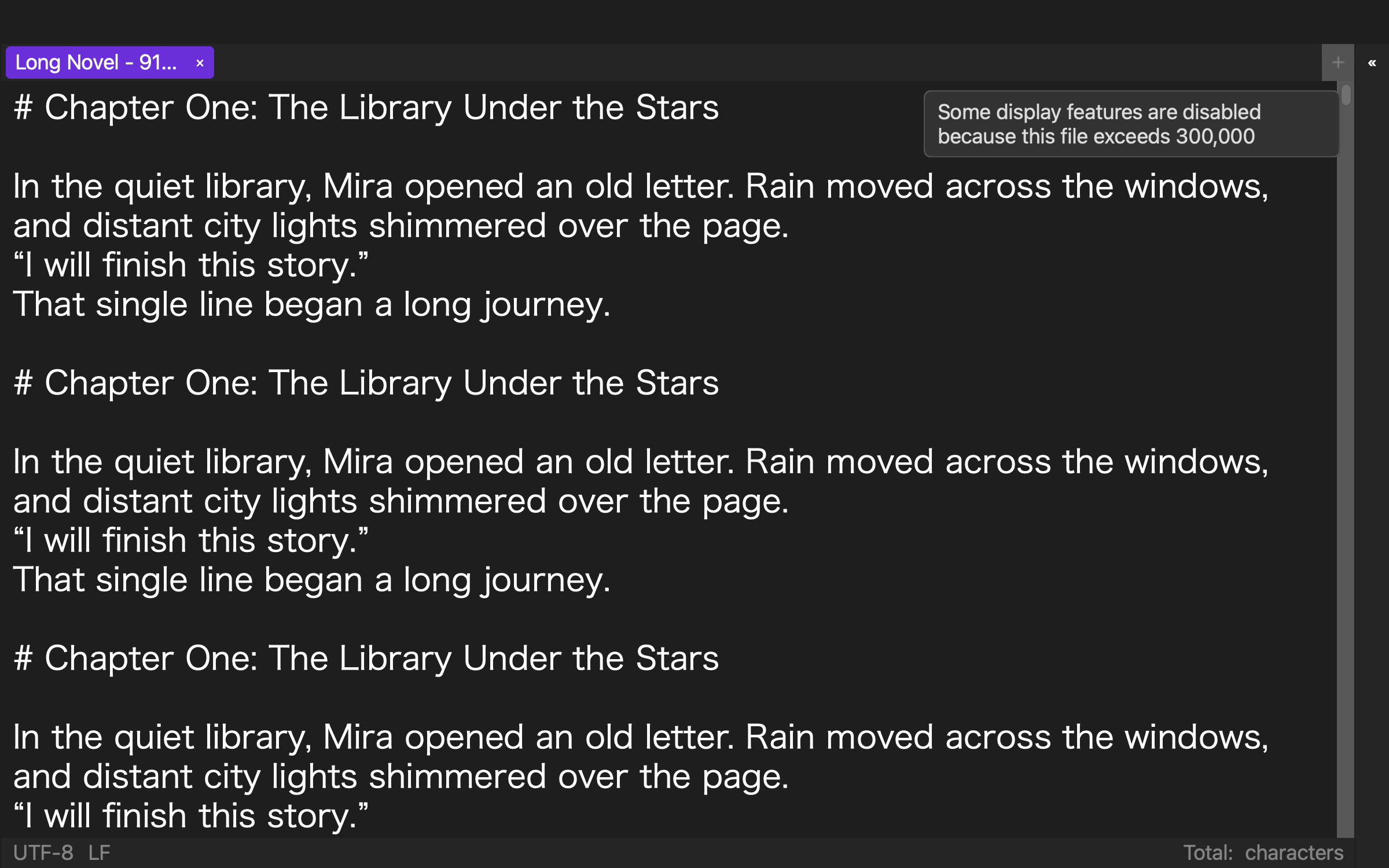
Rune Studio has an implementation for showing a notice when large-file processing begins and for disabling affected menu items. In the added visual check, a 919,514-character test manuscript was opened in the English UI. The large-file notice was visible, while line numbers, notation coloring, editing marks, and a continuous count were absent from the screen. Individual disabled menu items were not exercised one by one. The notice is an explanation, not a performance guarantee.
2. Continue editing the draft
Text editing and cursor movement remain part of the large-file design. In the development CLI test, the large manuscript was opened as a tab and a cursor position was saved successfully. Interactive typing, deletion, and undo feel were not evaluated.
3. Search instead of scanning
In-file find and replace and half-width-character search remain available. The test replaced one phrase in a copy of the 919,514-character content, manually saved the result, and found the replacement once in the saved destination. Keep a recoverable copy before replacement.
4. Check saving and encoding separately
Manual saving remains available, while autosave is conditional on safe encoding. The test wrote the 1,001,661-byte edited content and read it again through search and inspection. Autosave in the interactive interface was not exercised. If autosave pauses, check for an unrepresentable character instead of assuming that the 300,000-character threshold caused it.
5. Move display-intensive revision to a smaller target
If you need the suspended aids, revise a chapter-sized working unit. Keep one authoritative manuscript and deliberately return accepted edits to it.
What the 919,514-character test established
On August 10, 2026, Rune Studio 1.4.0 build 23 was tested through its development CLI in a dedicated temporary workspace. No production manuscript or user workspace was used. The fixture contained 919,514 characters and 24,272 lines in UTF-8.
Inspection returned isLargeFile: true. An in-file search then completed with exit code 0 and returned 19 matches for the requested Japanese full stop. An encoding inspection also completed; this fixture had no ranges that Shift_JIS could not represent.
The direct test covered large-file detection, saving a cursor position, search, one replacement, manual saving, a second search of the saved destination, and encoding inspection. After the replacement, inspection reported 919,517 characters, 24,272 lines, and isLargeFile: true. The list of suspended display operations, interactive input and undo, autosave, and each disabled menu item were checked only in current code and product documentation. In the added visual check, the large-file notice was visible, while line numbers, notation coloring, editing marks, and a continuous count were absent from the screen. The test does not prove typing speed in a real novel or identical performance on every Mac.
Keep one file or split by chapter?
Keep one file when book-wide search and a single authoritative manuscript matter most. Split by chapter when you frequently need display-intensive revision on a smaller range and already have a reliable way to search the full project.
A mixed workflow is also possible: preserve one large manuscript for drafting and global checks, then use controlled chapter-level copies for visual revision. The risk is not the number of files by itself; it is editing multiple supposed originals without a clear return path.
Reduce display work and preserve manuscript work
At 300,000 characters, a useful reduced-processing state pauses aids that constantly redraw or recalculate while preserving the operations that change, find, and save the prose.
Rune Studio automatically applies such a distinction at its current threshold, but that does not mean every Mac is guaranteed to feel fast. Manuscript content, hardware, and other open files still matter.
Test the behavior on a copy of your manuscript and note exactly what disappears and what remains. To evaluate the current Mac implementation and system requirements, visit the Rune Studio product page.