
Filling fields from top to bottom is not enough to keep EPUB metadata consistent. A title, author, series name, and volume number may also appear on the cover, in a colophon, on a website, and in a marketplace form. The safe workflow begins with one metadata source sheet for each book. Map that sheet to the editor input, generated OPF, and expected public display. This guide uses Rune Studio as a source-to-EPUB workflow and clearly separates it from tools that directly patch arbitrary existing EPUB files.
Create one metadata source sheet per book
Record title, subtitle, author, language, publisher, identifier, series name, volume number, update date, and the person who approved each value. Distinguish intentionally blank fields from undecided fields. Mark temporary values with an explicit status and deadline rather than leaving them indistinguishable from omissions.
Normalize series spelling before data entry. Decide on spaces, capitalization, and whether a visible title includes a volume label. Keep the series name and numeric order as separate source fields even when the marketing title combines them. That prevents string sorting and presentation choices from becoming the only record of sequence.
Map source, input, OPF, and public display
Use four columns: the approved source field, its Rune Studio input location, its generated OPF location, and the expected public display. Title, creator, language, and identifier should each have an explicit verification path. A file name containing the title is not evidence that the package metadata contains it.
Series data deserves its own rows. If a store later changes capitalization or formats a volume as Book 2, record that as public presentation, not a silent change to the source sheet. This preserves a stable production value while acknowledging that marketplaces control parts of their interface.
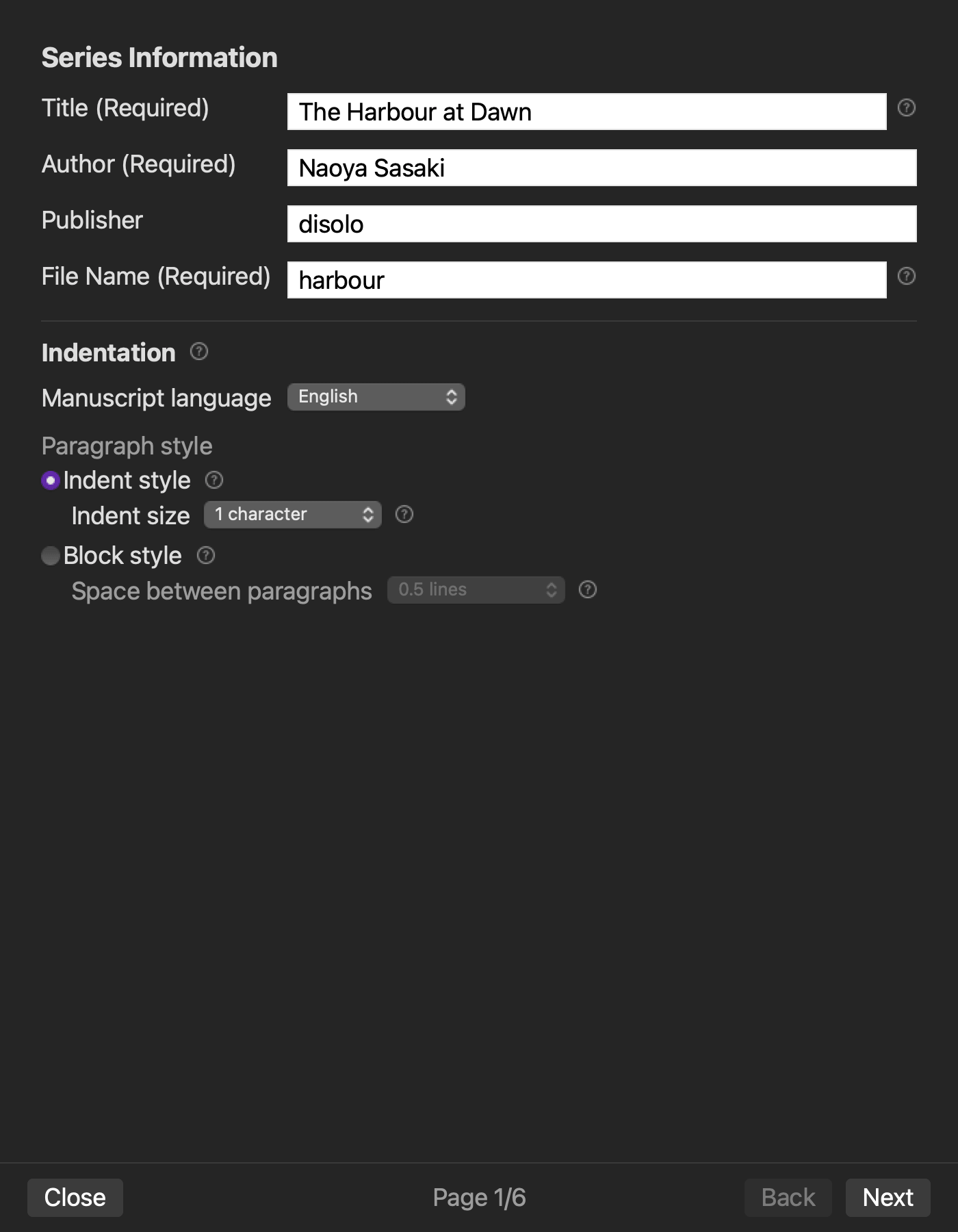
Enter approved values through the EPUB workflow
Rune Studio's EPUB workflow collects bibliographic information along with chapter order, TOC inclusion, and cover choices, then generates an EPUB 3 package. Keep the source sheet beside the configuration screen and mark each row only after entry. If wording needs correction, update the source sheet first and then re-enter it so that the application does not become an undocumented authority.
Record the configuration state needed to reproduce the build. Screenshots may help, but protect unpublished identifiers and personal data. The essential record is who approved the value, when it changed, and which generated file was checked.
Inspect the OPF after export
Open or inspect the generated package and compare its OPF with the source sheet. Check title, creator, language, publisher, and the title used for each volume. Also confirm that nav, NCX, and spine resources exist so the result can be traced as a complete test book rather than an isolated XML fragment.
On August 11, 2026, controlled exports produced distinct OPF title strings ending in Vol.1 and Vol.2 while preserving creator, language, and publisher. A separate cover-attached build exposed an unresolved CLI inspection issue: the package contained cover.png and referenced it correctly, yet inspect reported that resource as missing and returned valid=false. Treat that as a release blocker rather than claiming a successful covered-book inspection.
Change only the volume and rebuild
Duplicate the test source sheet and change only volume 1 to volume 2. Generate a new EPUB without modifying title style, author, language, series spelling, cover choice, or chapter settings. Compare the OPFs. The intended series-position field should change while unrelated fields remain stable.
If another field changes, investigate configuration reuse or template dependencies before producing a real sequel. Give every volume its own source sheet and output directory rather than overwriting the previous book. This prevents an old identifier or cover from silently surviving into the new release.
Know when a direct metadata editor is required
The phrase EPUB metadata editor can describe a utility that opens a finished package and patches one field. Rune Studio is primarily a workflow that generates EPUB from managed source text and settings. It is a reasonable fit when manuscript edits, chapter order, cover, TOC, and bibliographic changes should be rebuilt together.
If you received an external EPUB, must preserve unknown custom metadata, or need to alter one field without regenerating the package, evaluate a specialized direct editor. Test the round trip on a copy and inspect what it preserves. Similar product labels do not imply the same boundary.
Add release ownership and traceability
Before release, every provisional field needs an owner and confirmation date. Connect the inspected EPUB to its source revision with an export time and, for important candidates, a checksum. This avoids reporting a successful inspection of one file while uploading another file with the same visible title.
Store marketplace form values beside the source sheet as a separate channel. Rune Studio can generate package metadata; it does not submit account forms or guarantee store-side grouping. Maintaining that boundary makes discrepancies easier to investigate.
Conclusion: let the source sheet govern every build
A safe Mac metadata workflow begins outside the input form. Approve one source sheet, map it to application fields and OPF output, generate a traceable file, and change one field in a controlled rebuild. The volume-number test exposes dependencies before they affect a real series.
Start with five fields today: title, author, language, series, and volume. Generate a test EPUB and verify the OPF. Once those values can be reproduced from the source sheet, extend the same method to identifiers, publisher information, and release-specific fields.