
Buttons for a table of contents, cover, and colophon do not prove that EPUB software supports a maintainable book. For each element, identify the editable source, generated destination, and correction path after proofreading.
This is not a metadata omission audit or a one-field package-preservation test. It scores three reader-facing elements in the same fixture.
Build a two-chapter fixture
Prepare Chapter 1, Chapter 2, a short colophon source, and a rights-safe cover image. Use test values for title, author, language, volume, edition, and publication decision date.
The answer sheet states chapter order, navigation labels and targets, cover filename, and colophon fields to include or exclude. Do not change the expected answers after seeing the candidate’s defaults. Keep original images, manuscript, settings, and generated EPUB as separate roles.
Trace the table of contents
Record whether navigation comes from filenames, explicit chapter order, or headings. After generation, inspect nav, NCX, reading order, targets, and whether the colophon is included as intended.
Change one chapter label in the source and rebuild under a new filename. Confirm that nav, NCX, and the body heading follow the same decision. A correct navigation panel does not by itself prove that spine order matches.
Trace cover ownership
Separate the original image location, application setting, packaged image, and references from OPF or a cover page. Record how a moved source is detected or reselected.
Generate with image A, change the source setting to image B, and rebuild separately. The new package should contain and reference B without an obsolete reference to A. Preserve the old EPUB for comparison.
Retailer dimensions and review rules are separate from the ability to package a cover. Do not treat software selection as completion of store requirements.
Separate three kinds of dates
The reader-visible colophon can contain title, author, edition, publication statement, rights notice, and a safe contact decision. Do not put private contact data into the fixture.
A colophon publication statement, a project publishDate, and an OPF dc:date or generation timestamp may represent different decisions. Record where the candidate sends each field. A retailer release date may remain outside the editor.
Change the colophon edition from 1.0 to 1.1 and rebuild. Decide in advance which reader-visible and package values should change and which should remain.
Change one element per build
Do not change chapter label, cover, and edition together. Create a separately named EPUB after each single change and record target, output, inspection, and preservation of unrelated elements.
This produces an explainable difference: navigation files for the label, image references for the cover, and colophon or selected metadata for the edition. A combined build hides the cause of an unexpected package change.
Run internal inspection and at least one reader-view check separately. Zero internal issues does not prove that the cover or colophon appears at the intended location.
Keep a comparison sheet for every build. It should list output filename, source revision, expected single change, navigation count, cover asset, colophon edition, package inspection result, and reader used. Do not overwrite the earlier EPUB. If the newest file is called only “final,” you cannot prove which source produced the observed result.
After the third build, return to the first source state and regenerate once more. This fourth build checks whether the workflow is reversible or whether hidden state from later cover or navigation choices remains. Compare semantic package elements rather than requiring the complete archive hash to match, because compression order and generation time may differ without changing the book.
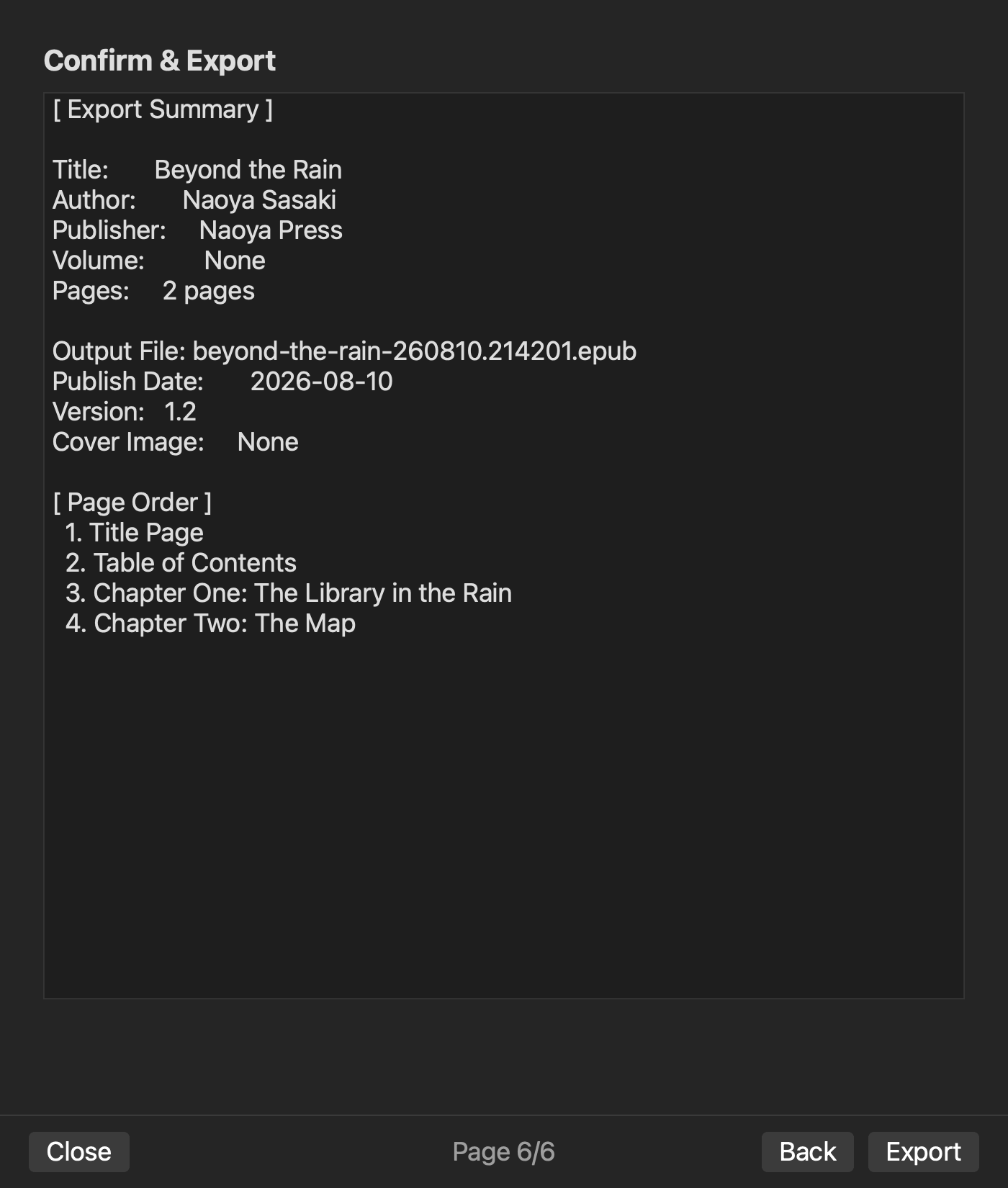
In an existing rune Studio level-4 operation, a two-chapter project received title, author, volume, edition, publication date, writing direction, and order. It generated a 5,444-byte EPUB with nav and NCX present and zero issues. An existing pre-generation Review screen visibly shows publication details, both chapters in page order, the output filename, and Cover Image set to None. Cover selection exists in the feature material, but that operation did not verify a cover-bearing export. It also did not perform the three single-element rebuilds in this article.
Score the return path
A means that source, destination, correction, and preservation are reproducible. B adds one documented manual check. C requires repeated re-entry or direct editing of the completed package. D leaves the source unclear or damages another element.
Put the candidate on hold if any of TOC, cover, or colophon receives D. For B or C, preserve the extra operation and inspection location. Do not let a high feature count compensate for an absent return path.
Also record ownership after closing the application. The manuscript, original cover, colophon source, settings record, and generated EPUB should each have an explainable location. A workflow that works only while an unnamed project remains open has not yet demonstrated a durable return path.
Choose software that rebuilds one corrected element
Use one two-chapter fixture to test the editable source, generated destination, and correction path for table of contents, cover, and colophon. Change a chapter label, image, and edition one at a time and inspect preservation after every rebuild.
The durable feature is not a one-time finished appearance. It is the ability to return one proofreading decision to the correct source and regenerate without damaging the other two elements.


