Opening the complete story bible beside a screenplay can replace writing with searching. Extract only the characters, location, props, and time required by the current scene. A focused scene card beside the script supports continuity without turning the second pane into another archive.
This is not a general two-pane layout guide and not a research-citation workflow. It uses the scene as the unit of work and decides whether each conflict must be corrected in the script or in the story bible’s source of truth.
Build one scene card
Before drafting, create a short card with scene ID, location, and time in the heading. Add four sections: characters present and their entrances or exits; physical location and movement paths; props, owners, and states; and elapsed or absolute time.
Attach the source heading or filename for each value. The card is an index, not a second master. When a decision changes, return it to the story bible rather than editing only the temporary card.
You may add one line for emotional intent, but do not copy complete biographies. If the card exceeds one screen, remove facts that cannot affect this scene.
Place script left and card right
Open the scene draft in the left pane and the card in the right. Give the script enough width for dialogue and action lines. Keep the card wide enough that its four facts do not wrap into an unreadable column.
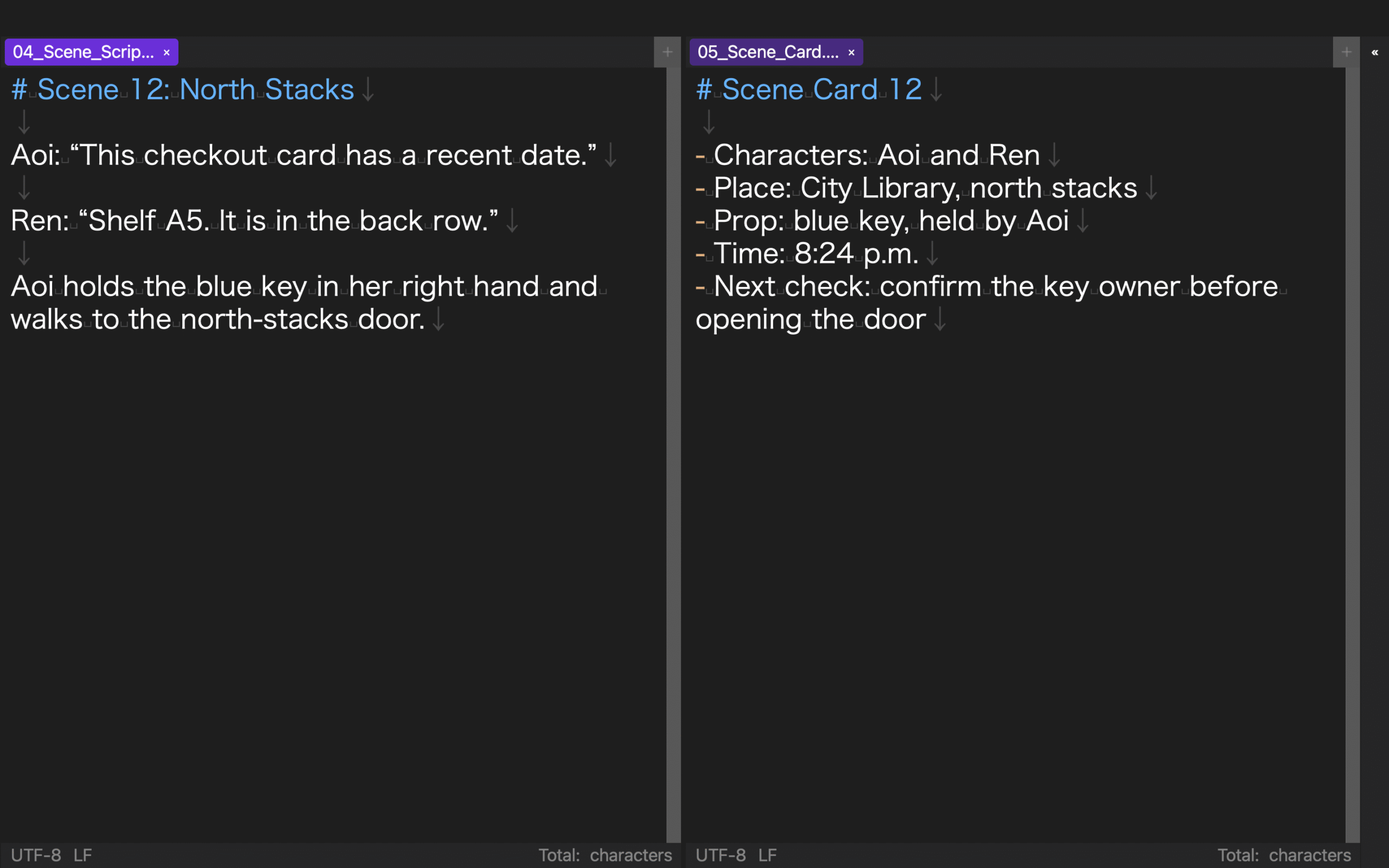
The complete story bible may remain in another tab. Open it only when the card cannot answer a decision, then return the pane to the card. This prevents a reference search from expanding into unrelated planning.
The rune Studio feature list describes horizontal, vertical, and nested splits with ratios. In a separate CLI verification, three tabs, an h3 layout, ratios 0.52/0.48/0.50, heading linkage, and linked states true/true/false were stored. Raw values matched after close/open. That supports configuration persistence only, not GUI tab movement, real scroll restoration, or synchronization accuracy.
Read the scene in four passes
In the character pass, confirm that every speaker is present and that entrances and exits occur before dependent actions. In the location pass, check doors, seats, distances, and movement direction against adjacent action lines.
In the prop pass, track who holds each object and whether it was placed, transferred, damaged, or consumed. In the time pass, compare dialogue and movement duration with daylight, appointments, and the previous scene.
Separate the passes. Reading all four dimensions at once lets dialogue meaning distract from physical continuity. Put a short searchable marker in the script and the corresponding card item when a decision cannot be made immediately.
Correct the right source of truth
When the script accidentally contradicts an established fact, correct the script. When the new scene deliberately changes the story decision, update the story bible and search for affected earlier or later scenes.
Do not resolve the conflict only in the scene card. The old master value will return the next time a card is created. Record the target source, reason, and affected scenes in one line at the bottom of the card.
Search again after the correction. Remove only markers whose decisions are complete. For a resolved prop or time change, reread the transition from the preceding scene because the local scene may be correct while the handoff remains impossible.
Use five completion conditions
Before closing the scene, confirm that character entry and exit order is explainable; location and movement connect; every important prop has one owner and state; time and elapsed duration work; and any changed story fact has returned to the master.
If an item remains open, add the responsible decision and the first next action. Dialogue polish and dramatic strength belong to another pass. This pass ends when continuity is explicit.
Hand state to the next scene
Create the next card by selecting only characters, place, props, and time that cross the boundary. Do not duplicate the entire prior card, because obsolete people and prop states will survive unnoticed.
For a carried prop, write owner, state, and last action line. For time, an offset such as “15 minutes after Scene 12” is sufficient when no clock time exists. This small handoff becomes the next writing entry point.
Put the current scene beside the script
For screenplay work in a split-view text editor, keep a four-part scene card beside the script instead of the entire story bible. Audit character, location, prop, and time continuity separately, then return each correction to the proper source of truth.
With five completion conditions and a selected handoff to the next card, split view becomes a continuity workspace rather than a screen full of references.
Repeat the same four-pass audit after any structural rewrite so that a moved entrance or deleted prop action does not silently invalidate the handoff.