An EPUB image problem often appears after a manuscript or image is moved, not when the image is first inserted. Use relative paths, record the relationship between the source file and the image, and test image movement separately from manuscript movement. The following specimen tracks one illustration through the source, preview, and generated-book workflow.
Describe the path from the source file
Suppose a project contains chapters/ch01.md and images/fig01.png. A general Markdown image reference from the chapter can be written as . The two dots move one directory up from the chapters folder before the path enters images.
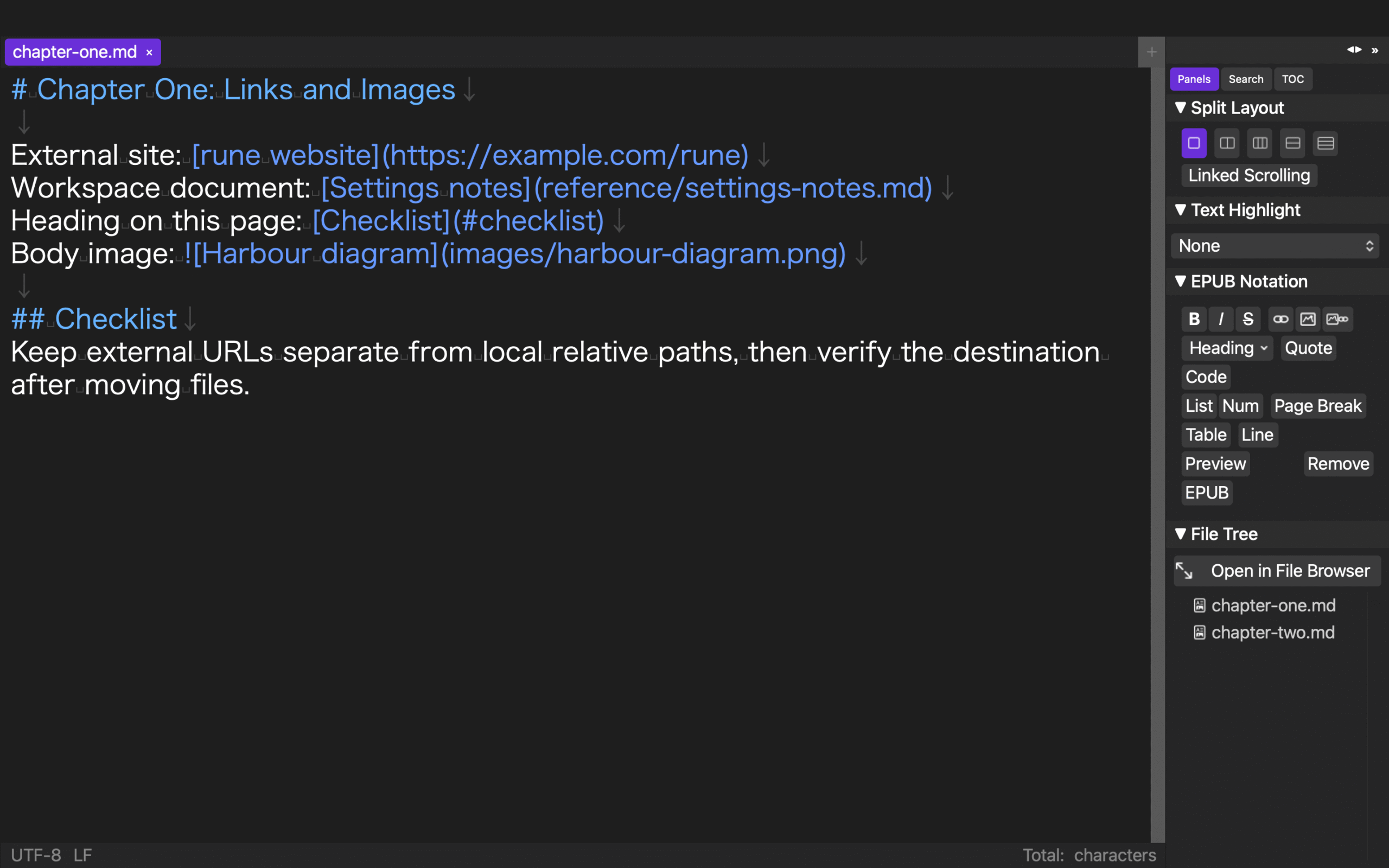
A relative path is calculated from the file containing the reference. If the manuscript is at the project root, images/fig01.png may be appropriate. If the manuscript is nested, the path changes even though the image has not moved. Avoid using a personal absolute path as the portable manuscript reference, because another Mac or an exported project will not have the same directory.
Alternative text has a separate purpose from the path. It describes the image; it does not locate the file. Check both fields rather than using a successful preview as evidence that the alternative text is useful.
Build a before-and-after reference table
Record the source file, old reference, moved item, destination, and expected new reference. For example, move fig01.png from images to assets. The expected reference from chapters/ch01.md becomes ../assets/fig01.png.
Before moving anything, verify that the file exists at the old location and that the preview shows the intended image. A duplicate filename elsewhere in the project can hide a mistaken path, so include the resolved destination in the record.
Treat body illustrations and the cover as separate rows. A cover may be stored in project settings rather than in a manuscript image notation. Updating one reference does not prove that the other followed the move.
Move the image and the manuscript in separate tests
First move only the image. Inspect the source notation, confirm the file at its destination, and refresh the preview. Then return to a known state and move only the manuscript, such as from chapters to draft/chapters. The relative route to the same image must now be recalculated from the new source location.
Moving both items at once creates two variables. A correct final preview would not reveal which update worked, and a broken preview would not identify which move caused the failure. Separate tests produce a usable diagnosis.
After each move, inspect the actual text of the reference. A preview can be misleading if an image is cached or if another file has the same name. Source text, resolved file, and rendered image should agree.
Know which references an updater is allowed to change
An automatic path updater should have a defined source-file scope and exclusion rules. External web URLs should not be rewritten merely because a local file moved. Page anchors such as #section identify a location within a document and also should not be treated as local file paths.
Do not generalize support for one Markdown-like image or link notation into support for every URL syntax, embedded HTML, CSS resource, or third-party EPUB structure. Test the exact source extension and notation used by the project.
Check open and closed source files
An open tab can contain unsaved text that differs from the file on disk. Decide whether to save, copy, or intentionally keep that state before moving a referenced item. Then include one open source and one closed source in the test. Inspect both after the move.
Encoding is part of the closed-file check. If an updater rewrites a closed source, it should not silently change the source encoding as a side effect. Even with documented preservation behavior, keep a diff or backup for important manuscripts and inspect the resulting bytes or encoding indicator when that requirement matters.
Include cover movement and deletion behavior
Move a cover image as a separate case and inspect the path stored in the work settings. A body image passing its test does not verify the cover setting. Before generation, confirm that the chosen cover is the intended file rather than a same-named copy.
Deletion has no new destination. If a referenced image is deleted, choose whether to cancel deletion, replace the image, or remove the manuscript reference. A warning can identify a remaining reference, but it cannot decide the editorial outcome.
The documented Rune Studio scope
Current documentation for the Mac version of Rune Studio describes path updates for image and link references in txt, text, md, and markdown source files. The listed behavior covers movement of a referenced file and movement of the source file itself. It includes relative references with parent-directory segments and a fallback that tries the previous workspace-root relationship.
The documentation excludes external URLs and page anchors from rewriting. It describes processing both open tabs and closed source files, with preservation of the original encoding for closed files. Cover-image paths can follow a move, and deleting a referenced item can produce a warning.
These are documented capabilities, not proof that the fig01.png specimen has been completed. They are also not a claim that every URL format, Markdown dialect, HTML resource, CSS reference, or existing third-party EPUB can be repaired automatically.
Verify the entire reference chain
A passing result has five parts: the source contains the expected relative path, that path resolves to the intended file, the editor preview shows the intended image, the cover setting remains correct when relevant, and the generated EPUB is checked separately. Preserve the before-and-after table so the same move can be reproduced.
To review the currently documented path-update scope, see the Rune Studio product page.