
Small interruptions in Japanese writing often happen at the handoff between an input method and the text editor. The practical fix is to separate five states: compose with the IME, confirm the candidate, select the committed target, make one correction, and verify the old and new forms with search. This workflow identifies whether a problem belongs to conversion, selection, or contextual editing instead of treating every mistake as a vague editor failure.
Decide whether the text is still under composition
When an IME candidate window or composition underline is still active, the text is not yet ordinary document text. Clicking or dragging at that moment may commit the candidate or split the composition unexpectedly. Finish the reading, choose the intended candidate, and confirm it using the input method before beginning an editorial selection.
Consider the Japanese phrase meaning “revise the composition.” The reading can produce different kanji compounds for composition and proofreading. The IME can present both, but only the sentence tells you which one is correct. Confirm a candidate first, then reread the completed sentence. If the problem is still in the candidate stage, return to the IME. If the wrong word is already committed, move to editor selection.
This distinction also helps with live conversion. If the same unwanted conversion occurs in several applications, investigate the IME or operating-system replacement settings. If only the selection of committed text behaves differently, examine the editor.
Match the selection width to the intended correction
Use a Japanese working sentence that says, in English, “Proofreading for Chapter 12 will finish on April 18.” Suppose the Japanese word for proofreading should instead be the two-kanji word for structure. The correction target is that committed word, not the date or the entire clause.
A double-click is useful for one committed word or one continuous run. A drag is more appropriate when the intended edit crosses character classes, such as changing the complete date from April 18 to April 19. The goal is not to score every possible boundary. It is to decide what the sentence needs and select exactly that unit once.
Inspect the highlight before typing. A fast selection that includes the chapter number, its classifier, or the following particle is not a successful shortcut. Cancel or adjust the selection before making the correction.
Verify one correction with old-form and new-form searches
After changing the first Japanese word, search for the old form. Each remaining match must be read in context: another occurrence may correctly refer to proofreading and must stay unchanged. Then search for the new form and confirm that the edited sentence is among the results.
This two-search check prevents a common failure in long manuscripts. A replacement may look correct at the cursor while an unintended occurrence elsewhere has also changed. Search results are not an instruction to replace everything; they are a queue of contexts that still need decisions.
Do not use Replace All merely because two strings look similar. Names, quotations, chapter headings, URLs, and model numbers can contain a matching sequence for an unrelated reason. Narrow the search with a nearby phrase or chapter when the old form has several meanings.
Undo a bad range before stacking another edit
If you meant to replace only 12 but selected a longer phrase, undo the replacement immediately. Do not repair the damaged sentence by typing fragments on top of it. First confirm that the original text has returned, then create a shorter selection and try again.
Search for the old form after undoing as well. This confirms that the recovery restored the expected occurrence and that no second change remains elsewhere. Treat “one correction, two searches” as a complete unit before moving to another term.
The return path now depends on the failure. A wrong candidate returns to IME composition. A wrong highlight returns to selection. A semantically wrong replacement returns to the search results and surrounding sentence. Keeping these return paths separate is more useful than changing several settings at once.
Separate IME, operating-system, and editor responsibilities
Unexpected text can be introduced at more than one layer. The IME chooses candidates and may learn previous choices. The operating system may expand registered text replacements. The editor handles committed text, selection, find, replace, and undo.
Record the point where the interruption occurred: reading entered, candidate confirmed, target selected, one occurrence changed, or searches completed. Reproduce the same input in another application when necessary. Change only the layer supported by that evidence.
This article does not compare Japanese IME accuracy. It also does not rank editors by how they divide every character class. Its subject is the writing-time handoff from confirmed input to a contextually verified correction.
Where Rune Studio fits in this workflow
Current public documentation for the Mac version of Rune Studio describes Japanese-aware double-click selection, drag expansion by character-class groups, and in-file find and replace. The relevant use here begins after the IME has committed the sentence: select the intended word or mixed-class phrase, correct one occurrence, and verify both forms through search.
This statement reflects published feature information; it is not a report that the example above was completed successfully on a particular Mac. Rune Studio does not determine the accuracy of an external Japanese IME. A separate article evaluates editor candidates by character-class boundary errors; this article deliberately leaves that comparison there.
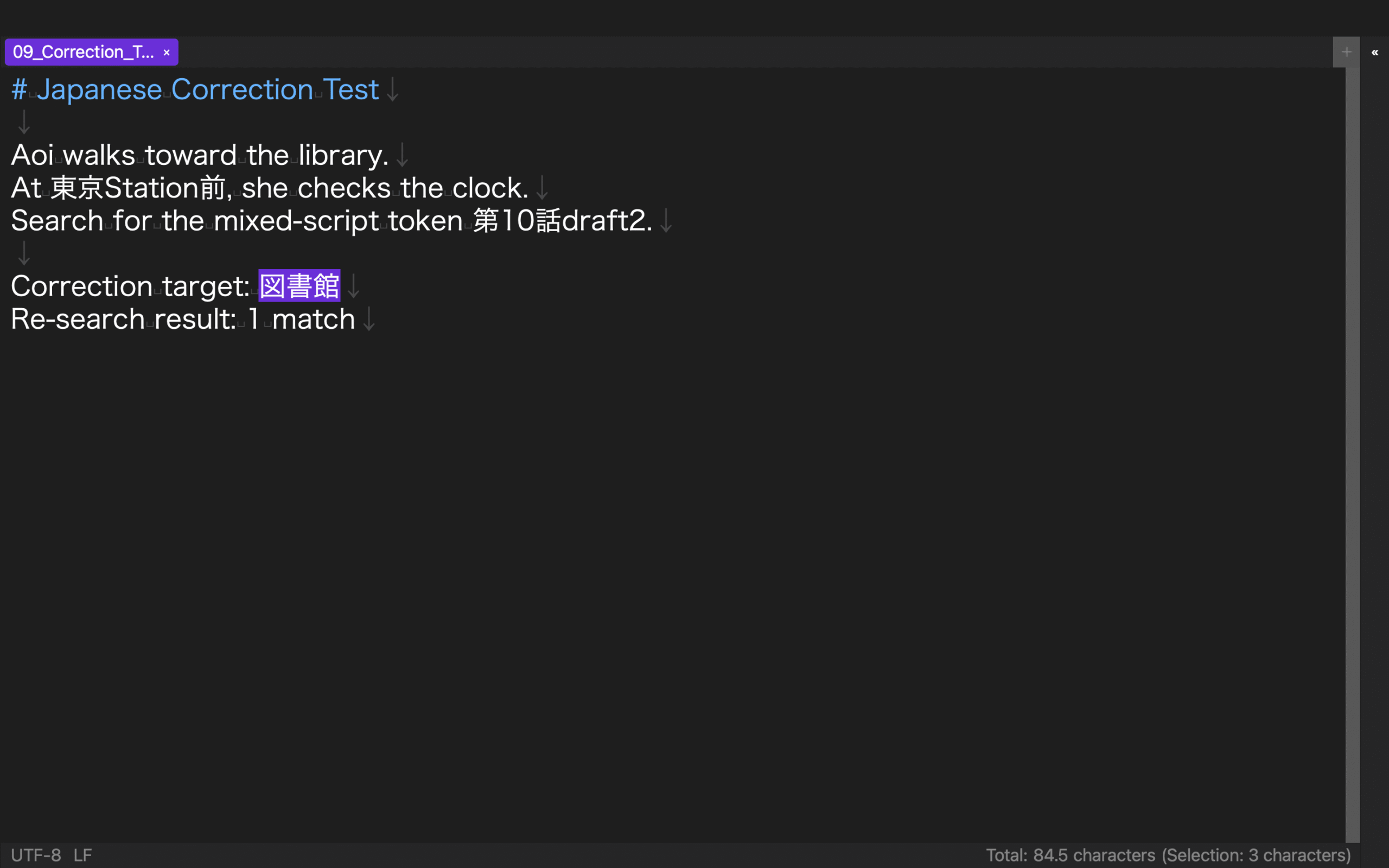
Run the five-state loop on one sentence
Type the working sentence through a Japanese IME. Confirm it before touching the committed text. Decide which word the context requires, select only that target, make one correction, and search for the old and new forms. Stop if the selection covers extra text or if search reveals a second meaning.
The useful outcome is not a claim that Japanese input has become universally faster. It is a reliable diagnosis: conversion errors return to the IME, selection errors return to the highlighted range, and contextual errors return to search evidence. That small loop removes repeated guesswork from Japanese drafting.