
To finish EPUB production through navigation, cover, and colophon, move one five-chapter sample through six stages: freeze the manuscript, set book information, select files, arrange chapters and TOC inclusion, set cover and colophon-source metadata, and confirm and export. Each stage hands a real production result to the next. Handoff fields support creation; they are not a substitute for creating the book.
A three-chapter general-book workflow creates and accepts body, navigation, cover, and colophon as four reader-facing results. This article instead finishes a five-chapter job through six production stages and identifies the correct return point after a change. Horizontal technical-book settings for headings, tables, code, body images, and navigation remain a separate workflow.
Define the six stages that finish five chapters
Create six production rows:
- Freeze the manuscript
- Decide book information and volume
- Select manuscript files
- Set chapter order and TOC inclusion
- Set version, publication date, and cover
- Confirm and generate the EPUB
Add owner, authoritative input, completion evidence, and next recipient to each row. A filled audit field is not the completion condition. Each stage must produce its stated result and let the next stage begin from the same source.
Freeze the manuscript and decide book information
The sample contains chapters C01 through C05. Stage 1 checks headings, boundaries, planned order, and unresolved notes, then freezes manuscript-v1 as the production source. This does not pretend that editorial work is complete; it identifies the one version allowed into production.
Current Rune Studio documentation assigns work title, author, publisher, orientation, filename, language, and paragraph settings to page 1, Series Information. Page 2 handles a single volume or volume number and previous outputs. Map the approved values in metadata-v1 and decide the volume state. This is a documented procedure, not an observed five-chapter UI run.
Select files and build chapter order and navigation
Page 3 selects the authoritative C01 through C05 files. Record a path or hash instead of relying on filenames alone. The result is a five-file input inventory that excludes older drafts.
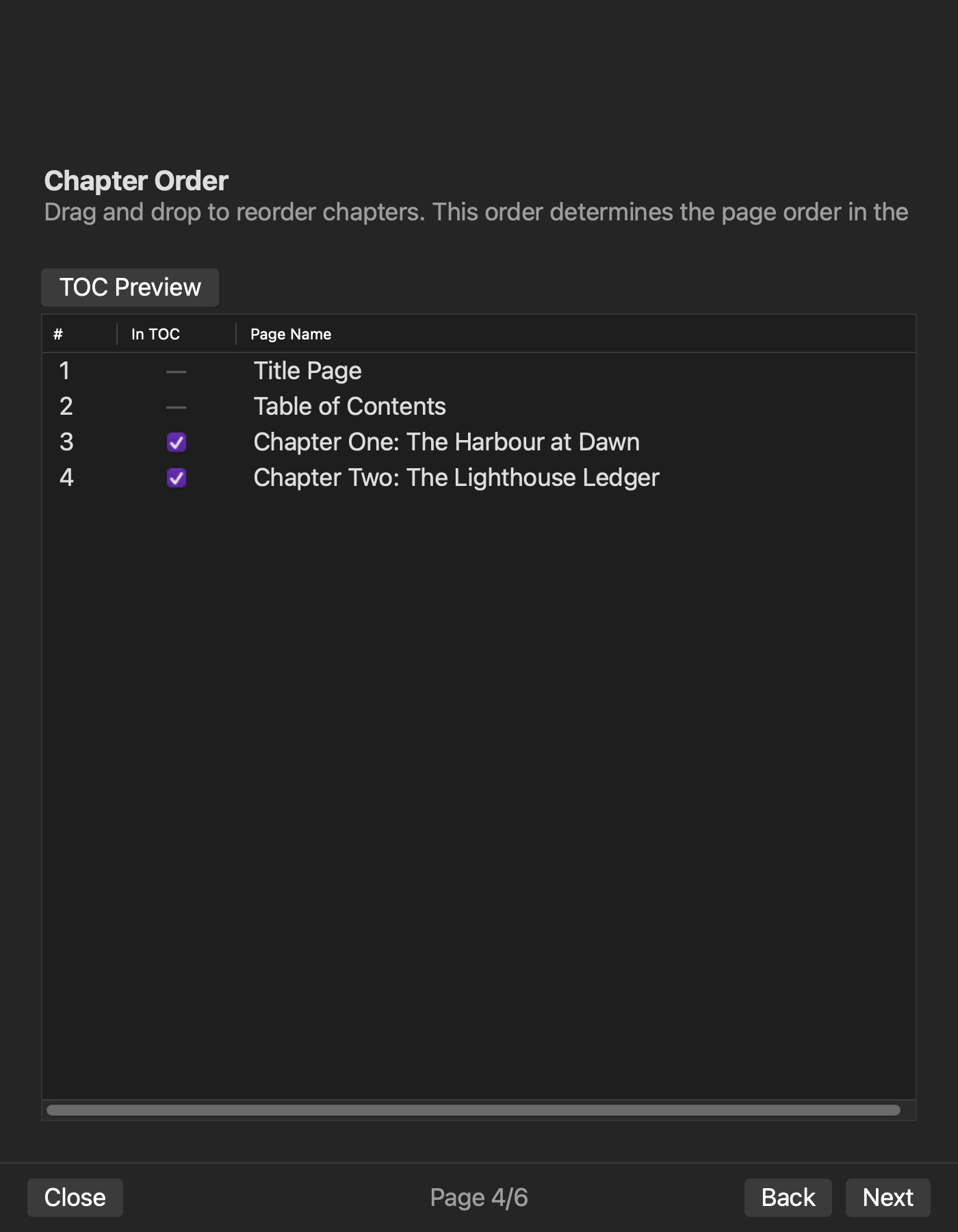
Page 4 arranges reading order and selects TOC inclusion. Record display label, chapter ID, and inclusion. If all five chapters appear, the counts are five chapters, five TOC entries, and zero exclusions. Excluding front matter or a colophon from navigation must not silently remove it from the book’s reading order.
This stage produces five-chapter order and navigation input for generation. It does not turn the article into a detailed post-export package audit.
Set the cover and metadata that feeds the colophon
Page 5, Metadata, includes version, publication date, and cover image in the documentation. Freeze the adopted cover as cover-v1 with its path and hash so it cannot be confused with a provisional image.
Check generated colophon values against work title, author, and publisher from Series Information and version and publication date from Metadata. Documentation lists colophon generation, but it does not establish separate wizard fields for project-specific contact or rights copy. Keep such approved copy in an external colophon-v1 source rather than inventing product fields.
Confirm the inputs and generate the EPUB
Page 6 confirms page order, TOC targets, cover, and filename. If the five-chapter order, five TOC entries, adopted cover, or work title differs from the production sheet, stop and return to the responsible earlier stage. Otherwise generate one EPUB and record filename, time, and SHA-256 as package-v1.
After generation, confirm the five body chapters and their order, nav and NCX entries, cover route, and adopted values in the colophon. If the cover-bearing review remains incomplete, do not close the whole workflow as finished merely because the image-free body, navigation, and colophon routes passed.
Use four handoff fields to support each stage
Owner, authoritative input, completion evidence, and next recipient prevent version mix-ups during creation. For chapter order, for example, the production operator owns the row, manuscript-v1 is the source, five-chapter order and five TOC entries are evidence, and the metadata/export operator is the recipient.
If the recipient cannot open the same source, the stage remains incomplete even if someone performed the action. A solo producer can retain the same protection by separating source-approval time from import time. The purpose is to keep the book moving through production, not to make an audit sheet the primary deliverable.
Return one change to only the necessary stages
If the author name changes to metadata-v2 after the first export, return to Series Information and regenerate the colophon and package. Do not change the five manuscript files, chapter order, TOC inclusion, or cover. Use a new output name and confirm both the revised author value and the protected inputs.
A TOC-label change returns to Chapter Order. A cover replacement returns to Metadata. The production sheet identifies the changed source, dependent stages, and protected stages so that the entire workflow does not restart without reason.
Keep the neighboring articles distinct
The three-chapter general-book workflow sets four inputs and accepts body, navigation, cover, and colophon. This five-chapter workflow moves the manuscript through six production stages, hands each result forward, and selects a precise restart point after a change.
A horizontal technical-book workflow prepares heading, table, code, image, and navigation settings. This article does not teach those notations or image routes. It owns the full production sequence that reaches navigation, cover, and colophon.
Separate documentation from observed Rune Studio evidence
Documentation describes the six-page wizard and EPUB output containing body, navigation, cover, colophon, OPF, nav, and NCX resources. An image-free two-chapter sample completed the generation settings and export path, then passed the completion check for OPF, nav, NCX, spine, and colophon.
The five-chapter sample, visible completion of all six pages, and a completed cover-bearing route were not observed. A cover-bearing sample contained cover and body-image bytes and references in the ZIP, while the completion screen treated the images as missing. The five-chapter procedure is therefore documentation plus a production method, not a completed product test.
Finish one book through six production stages
The direct answer is to freeze five chapters, set book information, select files, create chapter order and TOC inclusion, set cover and colophon-source metadata, and confirm and export. Handoff fields exist to pass each production result forward correctly.
Start by writing the authoritative five-chapter ID beside the six stages and mapping each approved book value to its stage. If Rune Studio is shortlisted, consult the Rune Studio product page while keeping the confirmed two-chapter result separate from the unobserved five-chapter interface and incomplete cover-bearing route.


