
To prepare a horizontal EPUB as a reflowable KDP candidate, do not try to preserve fixed page coordinates. Confirm that chapter order, the meaning and placement of figures, navigation destinations, and the adopted title, author, and publisher survive a reader font-size change. A book can look horizontal at one size while a figure separates from its explanation or an old navigation link reaches the wrong chapter.
The sample is a four-chapter horizontal essay with two figures and four navigation entries. This article does not describe the latest KDP data-entry interface, guarantee conversion or review, or promise identical output on every Kindle device. A technical book dominated by code and tables and a first-time EPUB creation workflow are separate topics.
Use relationships instead of fixed page numbers
Reflow changes the number of words on a screen according to font size, viewport, and reader. “Figure A is on page 18” is therefore a weak authority. Use a relationship such as “Figure A follows the paragraph that first compares tidal range in chapter C02.”
Assign chapter IDs C01 through C04. Figure A belongs to C02 after its first reference. Figure B belongs to C04 before the concluding paragraph. Record each image’s alt text, first referencing sentence, and owning chapter. Those relationships remain meaningful when page boundaries change.
The chapter sequence is C01, C02, C03, C04. Test it from navigation and by advancing through the reading flow. Navigation order and default reading order are separate structures, so either can be correct while the other is stale.
Confirm that horizontal settings do not retain top-to-bottom behavior
Select left-to-right horizontal composition. Verify that ordinary lines flow in the expected direction and that two-digit numbers and Latin text are not processed by rules reserved for top-to-bottom Japanese composition. A leftover page-direction or character-width rule can create odd punctuation or digits in some readers.
Choose one paragraph model: first-line indentation or spacing between paragraphs according to the book’s design. Applying both aggressively can produce excessive gaps when text is enlarged. Read the same transition at a small and a large font size.
Avoid long runs of spaces, manual line breaks used for centering, and blank lines used to force a figure onto a page. They can look aligned at one width and collapse under reflow. Use headings, paragraphs, image elements, lists, and other meaningful structure.
Anchor two figures to their first references
Introduce Figure A in prose before the image appears. The surrounding text should carry the point even when the image is not visible, and the alt text should describe the figure rather than repeat its filename.
At a small font size, reference and image may fit on one screen. At a large size, they may occupy successive screens. That is not automatically a failure. The image should still follow its explanatory paragraph, remain in C02, and fit the readable width without forcing unusable horizontal navigation.
Apply the same logic to Figure B in C04. Do not use many manual breaks to pin it to a chapter-ending page. If it reflows beyond the next chapter heading, check the source placement and chapter break.
Test navigation and reading order in opposite directions
Include C01 through C04 in navigation. For every entry, connect the visible label, stored destination, and reached heading. Test the beginning, middle, and end by selecting chapters one, three, and four.
Then ignore navigation and advance from chapter one through the book. Confirm C01→C02→C03→C04 and confirm that Figure A remains in C02 and Figure B in C04. The second route tests default reading order rather than only the table of contents.
An intentionally shortened navigation label can differ from the full source heading. Record that editorial difference. The label and heading need not be identical, but both must identify the same chapter.
Freeze three identity values in the candidate
For this candidate, compare title, author, and publisher across the manuscript title record, the EPUB package, and the pre-entry transfer sheet. This is not a full metadata design, but it prevents the KDP candidate from carrying another project’s identity.
Do not confuse a shortened filename with the adopted publication title. Do not append an unlabelled reading or romanization to the author value, and do not substitute a marketplace name for a missing publisher. The exact current KDP field behavior remains a separate check against current official guidance.
Use the confirmed Rune Studio horizontal structure
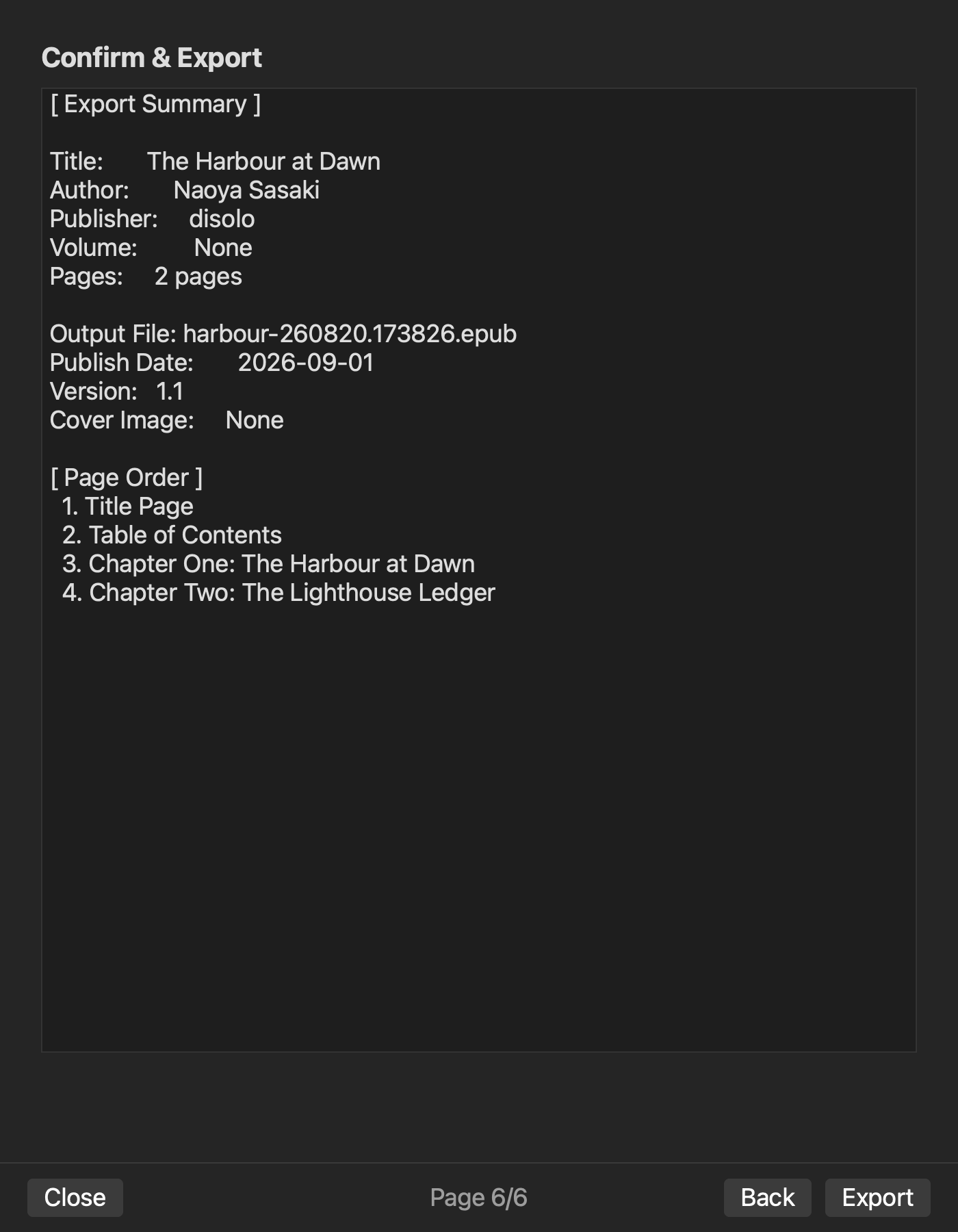
Current Rune Studio documentation for Mac describes a six-page EPUB wizard for title, author, publisher, composition direction, language, source selection, chapter order and contents inclusion, cover and date, confirmation, and output.
On August 14, 2026, a hands-on check with a disposable copy confirmed left-to-right horizontal output, body XHTML, nav.xhtml, NCX, content.opf, chapter order, and contents inclusion. The text-only EPUB checked as sound. This is hands-on verification evidence for the horizontal structure and navigation path.
The cover-enabled path did not pass the current structure checker even though the ZIP contained an image. The four-chapter, two-figure specimen, two reader font sizes, KDP upload, conversion, preview, review, and device display remain uncompleted. The two-size pass is an acceptance test, not an observed result.
Keep this role separate from nearby articles
A horizontal technical-book workflow concentrates on code blocks, tables, and technical figures. This sample is an illustrated essay. Its KDP-oriented decision is whether reflow at two font sizes preserves chapters, figure relationships, navigation, and three identity values.
A first-time creation workflow begins with raw source files and produces the first EPUB with navigation and a cover. This article begins with a candidate and performs a pre-handoff reflow check.
Conclusion: preserve four relationships at two font sizes
Fix four chapter IDs, connect two figures to their first references and owning chapters, test four navigation destinations and default reading order, and reconcile title, author, and publisher. Repeat representative checks at a small and large reader font size.
The first practical action is to write down Figure A’s owning chapter and first referencing sentence. If you are evaluating Rune Studio, review the current horizontal EPUB 3 scope on the Rune Studio product page.