To create a table of contents that appears inside an EPUB, treat the reader-facing contents page and the device navigation resources as separate outputs. First approve chapter IDs, labels, inclusion, and destinations. Include a visible contents page in the build, then compare its links with EPUB 3 nav, compatibility NCX, and spine reading order by stable chapter ID.
This article does not teach an editor’s heading outline. It starts after chapter IDs, labels, inclusion choices, and destinations have been approved in a chapter table. This workflow uses that table to build a page readers can open inside the book and then verifies packaged navigation and reading order.
Separate the visible page, nav, NCX, and spine
The visible contents page is ordinary book content. Readers encounter its heading, chapter labels, and links in the body area. It is packaged as XHTML and participates in the book’s reading sequence.
EPUB 3 nav is a navigation resource used by reader menus. NCX supplies compatibility navigation. The spine defines default reading order and can retain a chapter intentionally omitted from navigation.
The same label may appear in several resources, but the resources are not interchangeable. A correct page does not prove that the device menu is correct, and a chapter omitted from nav is not automatically absent from the book.
Prepare a two-chapter contents map
Use C01 and C02. Both remain body chapters in the spine, but only C01 is included in the contents policy. The expected result is C01 on the visible page, in nav, and in NCX, while C02 remains excluded from all three and retained in reading order.
Record chapter ID, approved label, visible-page inclusion and href, nav inclusion and href, NCX inclusion and src, spine position, and a destination clue such as the heading or opening sentence. Mark an intentional exclusion explicitly instead of treating a blank cell as policy.
Include the visible contents page in the build
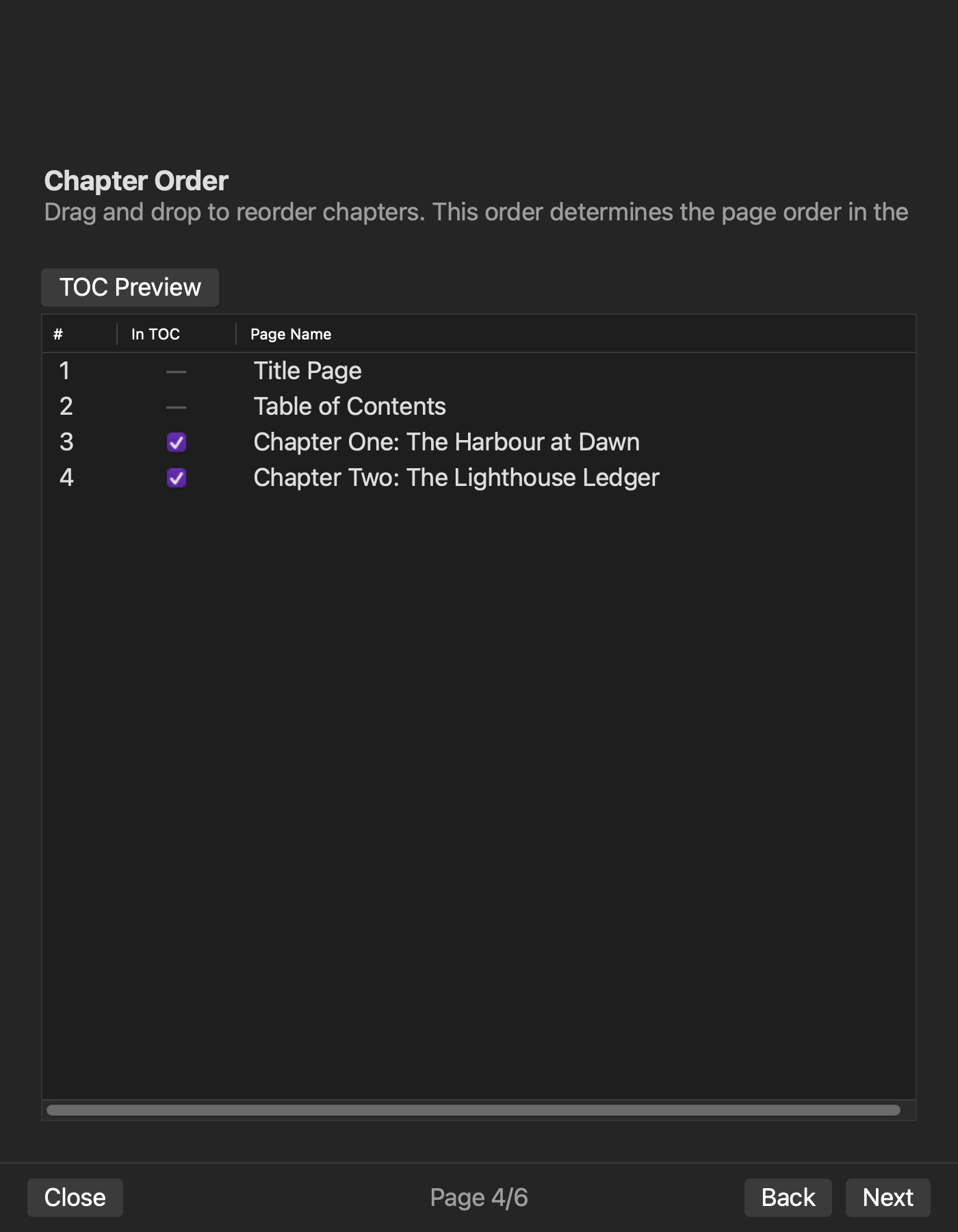
Rune Studio documentation describes chapter order, per-chapter contents inclusion, a contents page inside the book, nav, NCX, and spine generation. Using the approved map, include the visible contents page in the planned EPUB and export under a new comparison label.
The visible-page display and link route has not been completed. This is therefore a documented production method, not a statement that the article’s visible-page sample has already passed. Record the current interface labels and selected values when running it locally.
Keep the EPUB filename, generation time, and SHA-256. Do not combine a visible page from one archive with nav from another.
Check its labels and destinations
Unpack a copy and use the manifest and spine to identify the ordinary XHTML that serves as the visible contents page. Confirm its identity from the displayed heading and stored chapter links, not from a guessed filename.
For the sample, the page contains the approved C01 label and an href that reaches the C01 body XHTML. Identify the destination by heading or opening sentence. C02 remains absent under this approved policy but still exists as body content.
A correct label pointing to C02 or a missing resource is a rebuild condition. Repair the chapter map or generation setting rather than patching only the exported XHTML.
Trace nav and NCX to the same chapter IDs
Open the package-declared nav and NCX resources. Both should include C01 and exclude C02 in the sample. Resolve each href or src and confirm the destination content.
The visible page, nav, and NCX connect to the same approved chapter table, but they are separate resources. If the page contains only C01 while nav contains C01 and C02, return to the table and decide whether the difference is intentional or a build error.
Resource existence alone is insufficient. Compare inclusion, label, and destination.
Confirm reading order in the spine
Resolve spine item references through the manifest. Confirm that the visible contents page appears in the intended book sequence and that C01 is followed by C02. Exact positions can vary with front matter, so identify resources by content rather than raw count.
C02 remains in the spine even though the sample omits it from the page, nav, and NCX. If it disappears from every resource, the build may have lost body content rather than merely hiding a contents entry.
After changing inclusion, check both the resources expected to change and the spine expected to remain stable.
Separate confirmed navigation from the unobserved visible page
A two-chapter EPUB was rebuilt with C02 excluded from the table of contents. The completion check passed; nav and NCX were present; nav retained C01 only; and the spine retained C02.
That result proves the observed navigation-versus-reading-order distinction. It does not prove the visible contents page’s labels, clicks, or rendering in an external reader. Those checks remain required for the article workflow.
Internal resource consistency also does not guarantee identical menus or page rendering on every device.
Keep editor-side decisions in the approved chapter table
The earlier editorial step creates the input: chapter IDs, order, inclusion choices, labels, destinations, and editor-side movement checks. Its result is the approved chapter table consumed here.
This article consumes that table, builds a reader-facing contents page, and checks the visible XHTML, nav, NCX, and spine. It does not claim observed use of an editor contents tab, current-heading tracking, or level filtering.
Conclusion: close the visible page and navigation as separate resources
Approve chapter IDs, labels, inclusion, and destinations, then include a visible contents page in the EPUB build. After export, compare the page’s labels and hrefs, nav hrefs, NCX sources, and spine order against the same chapter table.
A table of contents shown inside the book is not complete merely because a device menu exists. Completion means the visible page and navigation resources reach their intended chapters while intentionally omitted content remains in reading order. Review Rune Studio’s current generated scope on the Rune Studio product page.