
To keep basic EPUB metadata consistent, establish five values on one information card: title, creator, publisher, language, and publication date. Then trace each value to the corresponding role in the EPUB package document. Re-entering them from memory on different screens invites semantic errors: an author in the publisher field, a human-language label where a language code is required, or a file modification date used as the publication date.
The sample book is Star-Dust Passage, by Mio Mizuki, published by Nagi Press, written in Japanese with language code ja, and dated 2026-08-30. This article does not cover ISBN assignment, series numbering, a sales description, KDP listing entry, or tax information. Its entire job is to keep these five meanings stable from the information card to the package.
Each of the five fields has a distinct meaning
The title is the adopted title of this edition. It is not automatically the series name or the output filename. If a subtitle is formally part of the title, include it according to a stated rule instead of alternating between a long and short form.
The creator is the person or entity responsible for the work. Store Mio Mizuki as the adopted form. A reading or romanization can be supplemental information, but it should not be appended without a label. The publisher is the issuing entity, Nagi Press, not the marketplace or the author’s unrelated affiliation. Even when an independent author uses the same name for creator and publisher, the roles remain different.
The language value identifies the publication’s primary language in a machine-readable form. Japanese is ja. Do not treat “Japanese” and ja as two competing values; connect the human description to the package value. The publication date identifies the edition’s publication date. It is not the manuscript creation date or the latest file-save time.
Put the value, role, and spelling rule on one card
Give the card five rows. For the sample they are title Star-Dust Passage, creator Mio Mizuki, publisher Nagi Press, language ja, and date 2026-08-30. If a value is undecided, say undecided; do not leave an obsolete value in place and interpret silence as approval.
Add a spelling or format rule where drift is likely. State whether a pen name includes a space, whether a publisher suffix is part of the adopted name, that the date uses YYYY-MM-DD, and that the language uses an appropriate language tag. When a spelling decision changes, update both the value and its rule.
Version the card, for example as metadata-card-v1. If the title changes, create v2 and link the generated EPUB candidate to that card version. A generated file without a card version forces the next editor to guess which values were authoritative.
Trace every row to the package document
After generation, unpack a copy of the EPUB and check the metadata portion of content.opf. The five semantic destinations are dc:title, dc:creator, dc:publisher, dc:language, and dc:date. Exact refinements can vary by production system, but the five roles must not be exchanged.
Checking that all five strings appear somewhere is insufficient. If Mio Mizuki appears as the publisher and Nagi Press appears as the creator, the file contains the right strings in the wrong roles. Read card field, adopted value, and package element as one three-part statement.
Check the language as a code, not merely as visible prose. Check the date for the adopted ISO form. A human-facing colophon may render the same date differently, but it must still refer to the same publication date rather than a build timestamp.
Restore the same five values after reopening
At the end of a session, record the card path, card version, associated manuscript version, and next field to verify. A screenshot of an application panel is not the authoritative record. On reopening, read the card first and compare the production settings against it.
If a setting is empty after a restart, restore it from the card rather than memory. If the screen retains an old value while a newer card exists, the current card wins. A single authority prevents repeated guessing about which copy is newest.
After another generation, check all five package values. A title-only editorial change can still expose a publisher copied from another project or an old language setting. Because the set is deliberately small, rechecking all five is more reliable than assuming untouched fields remained correct.
The documented Rune Studio input boundary
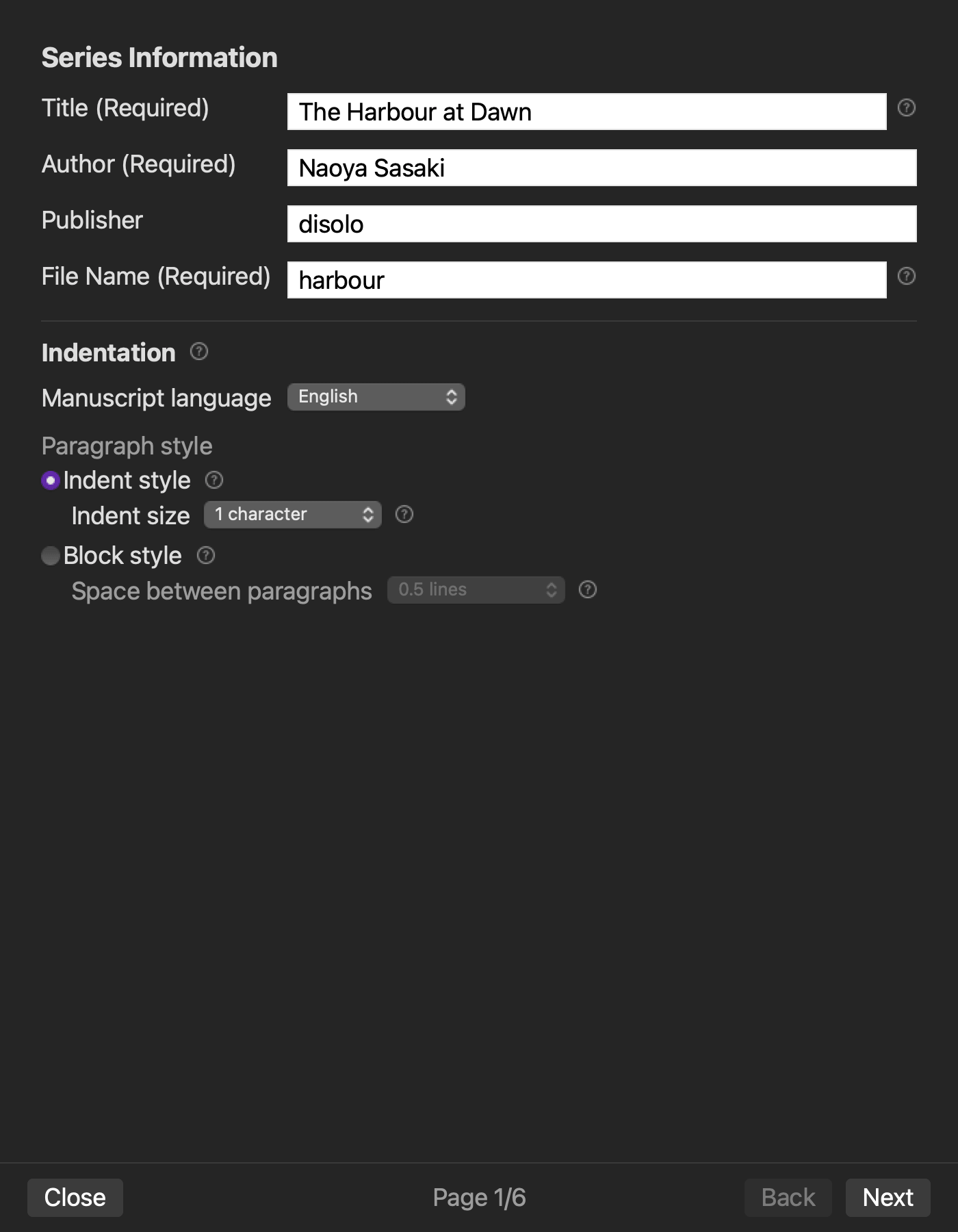
Current Rune Studio documentation for Mac describes a six-page EPUB wizard. Series information includes title, author, publisher, language, writing direction, and related book settings. A later metadata page includes publication date, version, and cover. The generated EPUB includes metadata in content.opf.
These fields and output roles are documented capabilities, not a completed run of the sample information card. Enter the five adopted values, generate a copy, and compare every package destination before relying on the result. This article does not promise automatic transfer to a KDP listing, ISBN assignment, marketplace acceptance, or successful restoration after an actual restart.
If Rune Studio is a candidate, keep the information card authoritative. Treat wizard fields as generation inputs and the package document as the result to check. Neither should silently replace the card.
Do not expand this into marketplace entry or final export approval
A KDP metadata workflow transfers title, author, and publisher to an external registration interface and checks the values backward after entry. This article never reaches that external screen. It includes language and publication date and stops at the EPUB package.
A final export approval workflow also compares chapter order, navigation, and a generation plan. This article does not decide chapter order or table-of-contents correctness. Its narrow output is five semantically correct metadata values.
Distinguish a spelling correction from an edition decision
Correcting an author’s misspelled name is a creator-value correction. Adding “Revised Edition” to a title while changing the book’s content may represent an edition decision. Do not overwrite the card without recording what changed and why.
The date should not automatically become today’s date during every rebuild. A revised edition may adopt a new publication date; a technical regeneration may preserve the existing date. Follow the publication decision, not the filesystem timestamp.
Conclusion: follow five card rows into the package
Create a five-row card for title, creator, publisher, language, and date. Enter the adopted values into the production workflow, then check the corresponding elements in content.opf. Reopen the project and use the same card version to restore or verify the settings before another build.
The first practical action is to write the adopted title in the title row—only one active value. If you are evaluating Rune Studio, review the current series-information and metadata scope on the Rune Studio product page.