
When editing EPUB metadata and navigation on a Mac, do not treat them as one undifferentiated form. Package metadata answers what the publication is: title, creator, publisher, language, date, and related identity fields. Navigation answers where a reader can go: labels, destinations, inclusion, and order. Change each from its own authoritative record, then prove that the side you did not intend to change stayed intact.
This article uses two deliberately small edits. The first changes the book title from Harbor of Wind to Harbor of Wind, Revised Edition. The second changes only the visible navigation label for chapter two from “Chapter Two: The Opposite Shore” to “Chapter Two: The Shore at Night.” It does not teach permanent patching of content.opf and nav.xhtml inside a third-party EPUB. The normal route is to return to the Mac production project and rebuild.
Package metadata and navigation answer different questions
The metadata section of the EPUB package document describes the publication. A title change belongs there. An author correction, publisher change, language code, or publication date also belongs to the publication record. None of those values, by itself, determines the label that a reader selects to reach chapter two.
The navigation document describes destinations. A table-of-contents entry combines a label with an href. The label can change while the destination remains the same. Conversely, moving a chapter file may require a new destination even if the reader-facing label does not change. A navigation edit should not silently alter the author or publisher.
Separating the two makes the expected result easy to state: “title changed; navigation unchanged” for the first build, and “chapter-two label changed; core package metadata unchanged” for the second.
Give the publication record exact adopted values
The publication record should contain an adopted value and, where necessary, a note explaining the spelling. For the sample, use these values: title Harbor of Wind, Revised Edition, creator Mio Mizuki, publisher Nagi Press, language en, and date 2026-08-30. Keep the old title in revision history, not beside the current title as if both were active.
For the first build, change only the title in the production source. Leave the chapter list untouched. Generate a distinctly named EPUB. Check the title value in content.opf, then check the chapter labels and links in nav.xhtml. The navigation should match the previous candidate.
If a title-only change also rearranges chapters or replaces a navigation label, the rebuild probably consumed another changed input. Editing the generated nav back into shape hides the source problem. Return to the chapter record or build settings and create another candidate.
Give each navigation entry a stable chapter identity
The chapter record needs a chapter ID, source heading, navigation label, destination, inclusion choice, and reading-order position. In the sample, chapter two is C02; its source heading is “Chapter Two: The Opposite Shore”; its new navigation label is “Chapter Two: The Shore at Night”; its destination is chapter02.xhtml#start; it is included; and its reading position is two.
For the second build, change only the navigation label. If the editorial decision also changes the source heading, record that as a second edit rather than smuggling it into the same test. After the rebuild, select the new label in a reader and confirm that it still reaches chapter two.
Check nav.xhtml for both the label and the href. Then check content.opf and confirm that title, creator, publisher, language, and date stayed the same as in the first build. The point is not merely that the new label appears. It is that a navigation-only edit did not leak into publication identity.
Compare builds against an expected difference
Name the first result something like harbor-metadata.epub and the second harbor-navigation.epub. Do not overwrite the first result. For each file, record the authoritative input that changed, the expected structural difference, and the values that must remain stable.
The expected difference for the first build is the package title. The expected difference for the second is the C02 navigation label. A production tool may also update an identifier or modification timestamp during generation. Classify such automatic changes separately. Otherwise, an expected generated value can be mistaken for an accidental editorial change.
Check reader presentation in two places. The library or publication-information view may expose the title, while the navigation interface exposes the chapter label. One screen does not prove that both records are correct. Keep structural review and reader presentation as separate observations.
The documented Rune Studio boundary
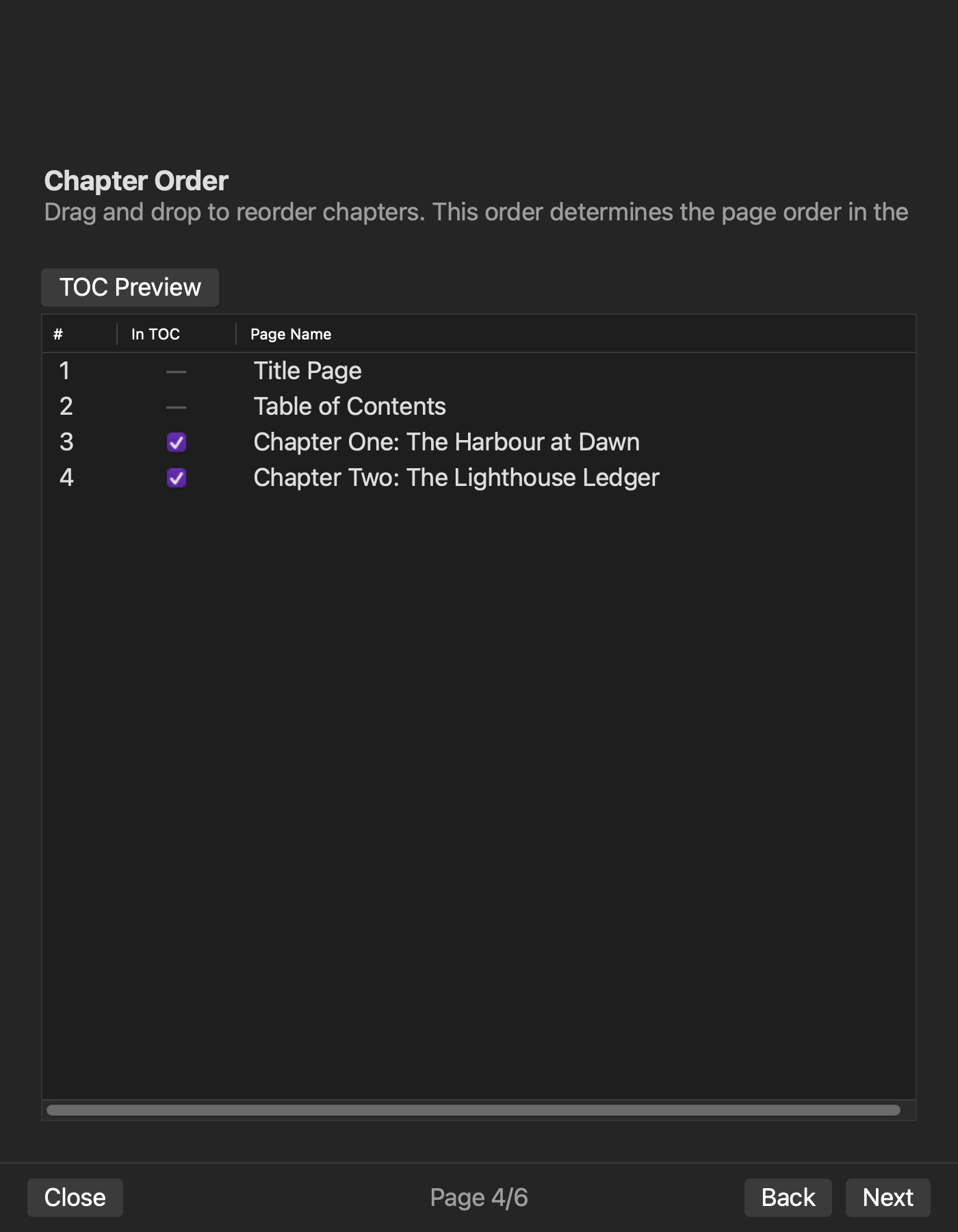
Current Rune Studio documentation for Mac divides EPUB setup across a six-page wizard. It describes title, author, publisher, language, version, publication date, cover, chapter order, and navigation inclusion.
A hands-on check in a copied production environment set bibliographic data, publication date, chapter order, and contents inclusion, then confirmed their generated nav.xhtml, NCX, and content.opf results. This shows which outputs receive metadata and navigation changes.
The cover-enabled path did not pass the current completion check. The exact six-page screen order and this article’s two-build title-only and label-only comparison were not completed. This article also does not say that Rune Studio directly imports and permanently patches arbitrary third-party EPUB package and navigation files. Marketplace acceptance and identical behavior in every reader are outside the scope.
Keep the role separate from nearby workflows
A final pre-export approval workflow compares a frozen manuscript, a bibliographic record, a chapter-order record, and a generation plan before authorizing one complete build. This article is narrower. It intentionally changes one authority at a time to prove the boundary between publication identity and reader navigation.
A visible-contents workflow asks how an XHTML page that appears in the reading flow differs from the reader’s navigation interface. This article does not design that visible page. It focuses on package values versus navigation labels and destinations.
If only a finished EPUB remains
A finished EPUB can be unpacked for review, but review does not make the generated files authoritative. If the production project still exists, edit its publication record or chapter record and rebuild. A patch applied only to the generated archive will normally disappear during the next generation.
If the source project is genuinely lost and direct repair is unavoidable, that is a different recovery task. Work on a copy, account for validation and packaging, and do not include DRM-protected or store-downloaded files in this workflow.
Conclusion: change one authority and prove the other stayed stable
First, change only the publication title. Confirm the new package title and unchanged navigation. Second, change only the chapter-two navigation label. Confirm the new label and destination, then confirm unchanged core package metadata.
The first practical step is to separate the publication record from the chapter-navigation record. If you are evaluating Rune Studio, review the current wizard and output scope on the Rune Studio product page before running the same two-build comparison.